

4-Participant
June 19, 2017
Solved

I am getting error as this value must be a scalar in polyroots function

  • June 19, 2017
  • 11 replies
  • 5947 views

Hi all,

I am getting error as 'This value must be a scalar

in polyroots function'.

Please can anyone help me.

I attached my mathcad code below.

Best answer by Werner_E

Which version and maintenance release of Mathcad are you using?

Maybe the problem is due to a bug in an older version which already is fixed?

Do you get the error already in the last line of your sheet when you just define the function r or when you try to evaluate it via r(10)=

I also experience no problem in evaluating your function r (Mathcad 15, M045).

When calculating your various coefficients a(i), b(i), etc. every call evaluates the solve blocks again and again. This could be speeded up significantly by creating a function which calls the solve blocks just once and then calculates and returns ALL of the necessary coefficients in a vector.

Doing so would be quite some work in rewriting the sheet but probably worth the time spent.

Her a small example - the function I1(i): Your version of this function calls the solve block for f three times while the version below calls it only once (and we don't need the function x1(i) and x2(i) you defined above anymore):
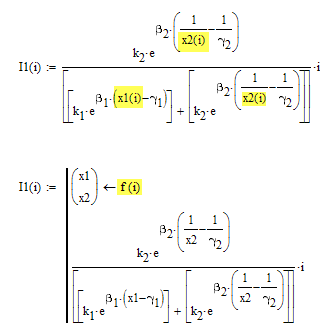
using this new function I1 and a similar one for I2 already cuts the time to calculate r to one third and the whole sheet could be speeded up much, much more, I guess.

Nevertheless you experience that strange error. So lets try some changes (I am just poking around in the dark):

What do you get when you evaluate B(10)=? Do you get
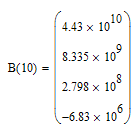
If yes, try to reformulate your function r
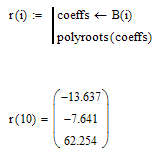
Do you get the result or do you still experience that error?

11 replies

21-Topaz II
June 19, 2017

Hi vetri,

It seems to me that there are no problems. It only takes a long time to compute ..

test eg vetri veeran.jpg

Greetings

Franc

vveeran4-ParticipantAuthor
4-Participant
June 19, 2017

Dear Franc,

Thank you for your reply.

But, for me I am getting the same error as 'This  value must be a scalar'

Could you please attach your code.

Thanks.

21-Topaz II
June 19, 2017

The polynomial is of the third degree, so we have three roots (all real or one real and two c.c.) for each i value. I have erroneously traced the root vector module. To trace the module of each root, varying i, it takes a long time.

test eg vetri veeran 1.jpg

test eg vetri veeran 2.jpg

Werner_E25-Diamond IAnswer
25-Diamond I
June 19, 2017

Which version and maintenance release of Mathcad are you using?

Maybe the problem is due to a bug in an older version which already is fixed?

Do you get the error already in the last line of your sheet when you just define the function r or when you try to evaluate it via r(10)=

I also experience no problem in evaluating your function r (Mathcad 15, M045).

When calculating your various coefficients a(i), b(i), etc. every call evaluates the solve blocks again and again. This could be speeded up significantly by creating a function which calls the solve blocks just once and then calculates and returns ALL of the necessary coefficients in a vector.

Doing so would be quite some work in rewriting the sheet but probably worth the time spent.

Her a small example - the function I1(i): Your version of this function calls the solve block for f three times while the version below calls it only once (and we don't need the function x1(i) and x2(i) you defined above anymore):

using this new function I1 and a similar one for I2 already cuts the time to calculate r to one third and the whole sheet could be speeded up much, much more, I guess.

Nevertheless you experience that strange error. So lets try some changes (I am just poking around in the dark):

What do you get when you evaluate B(10)=? Do you get

If yes, try to reformulate your function r

Do you get the result or do you still experience that error?

25-Diamond I
June 19, 2017

Here is a sheet where i have speeded up the second solve block which called the first one over an over again and was one main reason for the slow claculation.

The evaluation of r is now accelerated by a factor between 100 and 200 and there is still great potential for further improvements, once your problem with the polyroot function is solved.