

Solved
I want to change my work sheet to be fast calculating
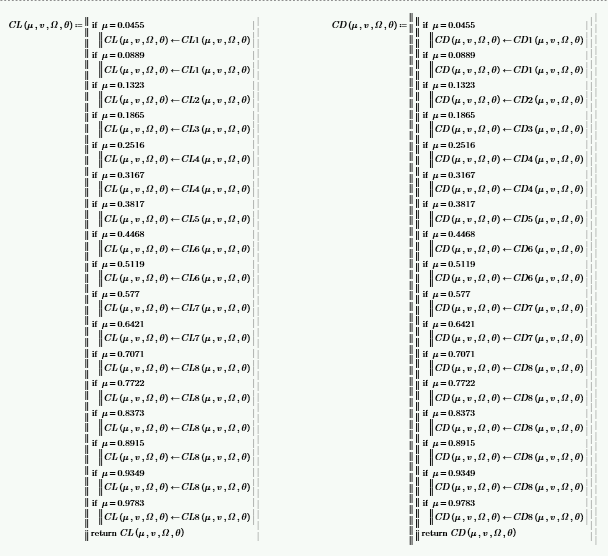
my calculation is slow
so I guess it is due to "if" such as upper picture.
How can I change it to be fast?
I attached my file.

my calculation is slow
so I guess it is due to "if" such as upper picture.
How can I change it to be fast?
I attached my file.
Here is an approach which saves a lot of typing and eliminates all if-statements as well as the definition of the 16 functions. CD1..CD8 and CL1..CL8.
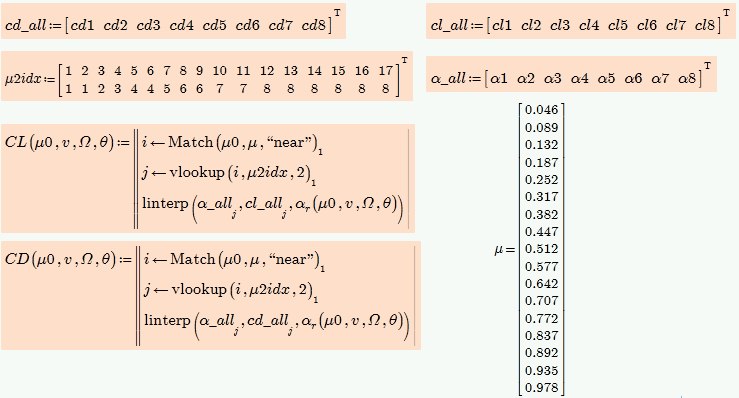
Nevertheless I guess that its not the if-statements and/or the local functions which are responsible for the slowness of those functions. The cause is rather the continuous evaluation of the solve block functions a.r. and a'.r by alpha.r.
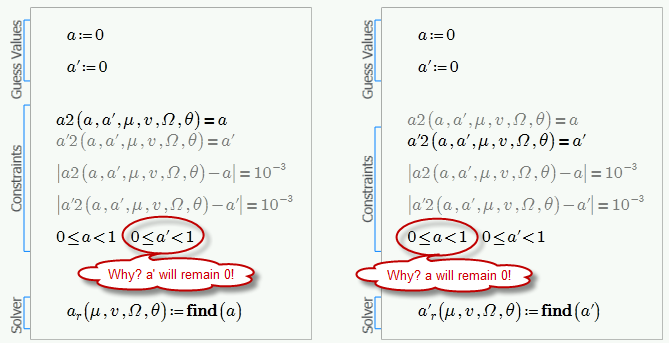
I also guess that the solve blocks for a.r and a'.r are wrong as possibly a and a' should be solved for at the same time. As it is set up now, one of them will remain 0. Jinsuk, is this really what is needed that one of those two values is zero and just the other is solved for? In an earlier version you had a solve block I provided which solved for both variables a and a' simultaneously and you changed it now because you got negative values. But what you calculate now is something completely different - you have to know what you really need, so take care!
You define a lot of functions and you nest those functions in an awfully and very inefficient way. For example the function C.P.
C.P calls P,
P calls MO,
MO calls r and m,
m calls v.r, ct, c and r,
v.r calls r, a.r, and a'r,
ct calls Phi.r, CL and CD,
Phi.r calls a.r and a'r,
CL and CD both call alpha.r,
alpha.r calls beta and Phi.r
and Phi.r again calls a.r and a'.r.
Puhh!
To summarize: One single evaluation of C.P requires eight  times the evaluation of one of the solve blocks (4 time a.r and four times a.r). The interpolating function r is called three time as is Phi.r. If you search for a.r and a'r in one single solve block and rewrite C.P in a more efficient way, you could cut calculation time at least to 1/8. But this would require some bigger changes in your sheet.
No account yet? Create an account
Enter your E-mail address. We'll send you an e-mail with instructions to reset your password.