


Multithreading in Mathcad Prime 2.0
We are looking into the multithreading feature in Mathcad Prime 2.0 and are wondering how people are using it.
Multithreading—When on, Mathcad can simultaneously perform multiple independent calculations. This may speed up calculation of some worksheets that contain a number of independent calculations, by better utilizing multi-processor systems.
We're investigating if multithreading should be the default (always on) or if users want to easily change the setting to turn it off for a specific worksheet.
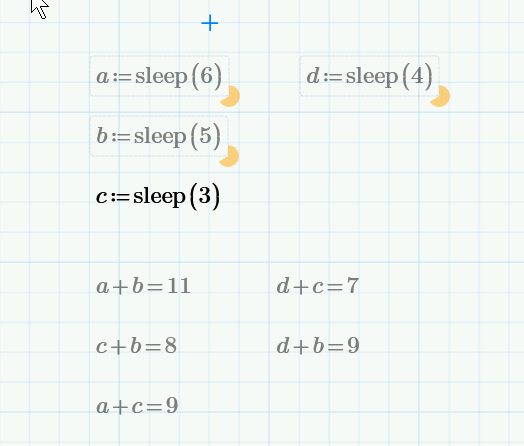
Attached is a Mathcad Prime 2.0 worksheet showing how mulithreading works. To run the worksheet, turn on Multithreading, then recalculate by pressing F5 or F9.
To turn on Multithreading:
- Go to Calculation Tab > Calculation Options button.
- Click on the Multithreading button.
Here you can see 3 calculations running at once and one that has finished. Sleep just tells Mathcad to pause for the number of seconds in the argument.
I'd like to see some examples how you might use multithreading and also examples of when you'd prefer sequential processing.
Thanks,
Mona