10-Marble
September 28, 2024
Solved

Range Plot with Logspace and Units

  • September 28, 2024
  • 3 replies
  • 10021 views

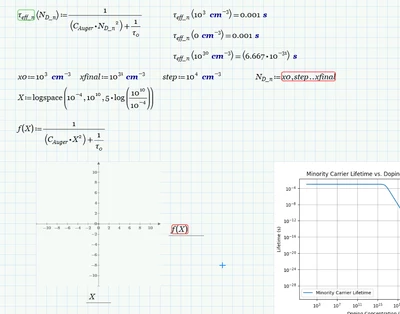
Im trying to plot, lifetime as a funct. of doping, and abs. coefficient as a function of wavelength. I've looked up some videos and good instructions from this Solved: How to produce a log based range variable or plot ... - PTC Community but I have a problem getting the plot to show while defining the range correctly, ie, units for the start and stop, adding steps. I can pull it up with python but not with Mathcad and I can't find out why. thank you,

cadtelsim_0-1727551775380.png


Thank you,


Best answer by Werner_E

It would be a good idea to make the function QE_emit work OK with a single scalar value of lambda (without any vectorization). Once you have tested that function, you can call it vectorized with vector argument(s).


What I noticed so far:

When you write a(lambda) Prime assumes a function a, which does not exist. If you meant a * lambda you would have to explicitly write is a multiplication. So you would write e.g.

Werner_E_0-1727609296772.png

but I still wonder as you defined x being zero, so this expression would always be constant 1


As you now multiply by a (which has unit 1/m), there is again a unit mismatch because now the exponent again is not dimensionless but has the unit meter.

You could make x dimensionless again, but you would run into problems with the sinh and cosh function. Their argument must be dimensionless, too, and as Ln is a length, xj must be a length, too.

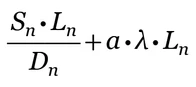
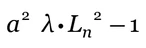
Further unit mismatches in the expressions
Werner_E_1-1727609613350.png

and

Werner_E_2-1727609642099.png

where one summand is dimensionless while the other is  a length.


So you have to fix the unit mismatches in your formula first, then set up the function in a way that it works for a single argument lambda and the n you should be able to call it with vector arguments.


P.S.: Guess we again are far away from the thread topic "Range Plot with Logspace and Units "

3 replies

23-Emerald V
September 28, 2024


You have a unit incompatibility error.  Your X is unitless, CAuger is cm6/s and t0 is s.


2024 09 28 D.png

25-Diamond I
September 28, 2024

Just answered your question in the old thread before I saw your new one here 😉

See Solved: Re: Circuit ODE set up and solution - symmetrical ... - PTC Community

Werner_E_0-1727565819025.png


I found that 100 points would suffice for a decent plot. The way you had used logspace would only create 70 points which may be a bit too coarse. Stuart increased to 1400 points 😉


BTW, while its not necessary to use vectorization because X^2 is an operation not defined for vectors and so Prime would apply automatic implicit vectorization, I would nonetheless suggest to use explicit vectorization on f(X). Just good habit IMHO and it avoids unexpected results if some day you define a function differently. You see the difference if you replace X^2 by X*X 🙂

23-Emerald V
September 28, 2024

I thought I'd changed the x-axis scaling to logarithmic before posting, but clearly not.  However, when I corrected that deficiency (and extended the range ... I didn't know why the OP had chosen those values and assumed they had some reason to do so), the plot still looked different to what I expected.  I rewrote it to match what you'd written (in case I missed something obvious or some other weird interaction was happening), but I got the same plot.  So, in desperation, I deleted the plot and created a new one (with log axes), and hey, voilà, success.


Stuart

25-Diamond I
September 29, 2024

@StuartBruff wrote:

I thought I'd changed the x-axis scaling to logarithmic before posting, but clearly not.  However, when I corrected that deficiency (and extended the range ... I didn't know why the OP had chosen those values and assumed they had some reason to do so), the plot still looked different to what I expected.  I rewrote it to match what you'd written (in case I missed something obvious or some other weird interaction was happening), but I got the same plot.  So, in desperation, I deleted the plot and created a new one (with log axes), and hey, voilà, success.


Stuart


What shall I say ... its Prime time 😉

I also noticed just now when the axis is scaled logarithmically, Prime does not allow to change the second value on the axis and thus controlling the step width.

I wanted to change the exponent to show every fourth to match the picture, but I only was able to set the top value on the y-axis to 10^-3 and the bottom one to 10^-30, but I was not allow to change the second value from 10^-27 to 10^-26. That's silly and an unnecessary restriction!

ttokoro
21-Topaz I
21-Topaz I
September 28, 2024

image.pngimage.pngimage.png

t.t.
ttokoro
21-Topaz I
21-Topaz I
September 29, 2024

image.pngimage.pngimage.png

t.t.
cadtelsim10-MarbleAuthor
10-Marble
September 29, 2024

I was looking at this matrix operation in your sheet, and I need to find a good video to learn it. Can you explain to me what is happening in this calculation?