
1-Visitor
August 30, 2017
Solved

Units are not compatible

  • August 30, 2017
  • 3 replies
  • 20340 views

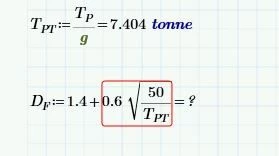
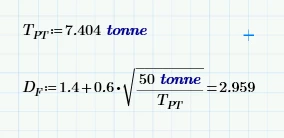
I'm trying to create a calc where the answer is a design factor. The calc works fine when just using numbers, but when I try to use a value from earlier in the sheet I get the 'units are not compatible message'. Would appreciate any help on this, thanks.
Capture.JPG

Best answer by AlanStevens

You need to give the 50 units also:


units.PNG


Alan


3 replies

1-Visitor
August 30, 2017

1.4 is a dimensionless quantity

a similar question

19-Tanzanite
August 30, 2017

You need to give the 50 units also:


units.PNG


Alan


1-Visitor
January 29, 2021

What is wrong.jpg

25-Diamond I
February 11, 2021

1) Open a new thread for a new question as this increases the likelihood of a quick response and keeps he forum clearer

2) You shouldn't only show a picture but also attach your worksheet. Its much harder to debug a picture than a live worksheet


Are you sure about the Unit N/m for G.c, but just N for G.b?


The way you define Az both must have the same dimension and the result in either case will be dimensionless and not Newton as you seem to expect.


And when you define H, you are trying to add a force (A, Newton) and two lengths (Ab and Ac, meter) . Obviously this can't work and so Prime thankfully refuses to do so

1-Visitor
August 30, 2017

This is the biiiiiiig old problem of "designed equations" from diverse textbooks or scriptums for example. A really big Problem

You have to check out first, which dimension the variable Df must have.

The parameter 1.4 must have the same unit like Df.

If 0.6 is a uitless factor then ok, but the 50 must have the unit of Unit(Tdt)*Unit(Df)²


1-Visitor
August 30, 2017

If you combine the two solutions: first and second, you can find a way to formalize the empirical expressions

изображение.png