5 replies

3-Newcomer
April 11, 2025

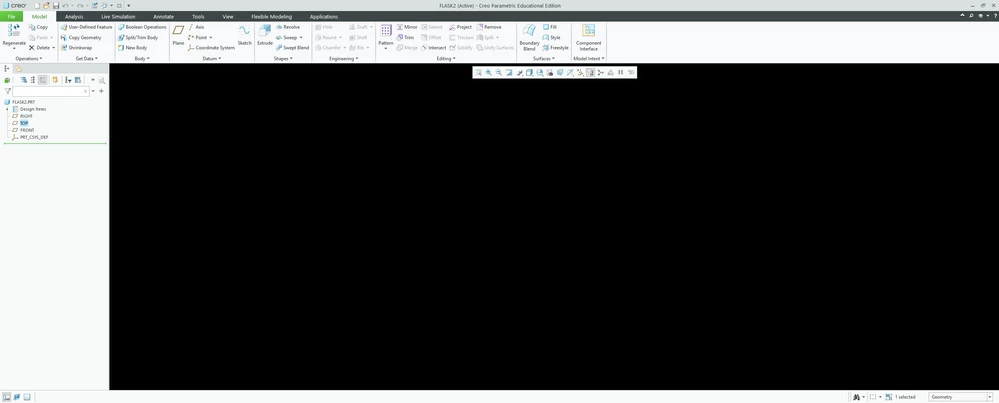
i dont know how to fix this please help

23-Emerald III
April 11, 2025

Has it worked before? Or are you just trying it for the first time? What graphics card are you using?

Normally, issues like this are related to graphics cards and/or their drivers.

If you have a config.pro, add the following line:

graphics win32_gdi

You can do this using a plain text editor.

Restart Creo and test. If you can see your model, then your problem is graphics card related.

Edit the config.pro again and remove the line you added.

Update your graphics card drivers, you may have to try different drivers.

Between each driver upgrade, restart your computer.


3-Newcomer
April 11, 2025

it has worked before, i have redownloaded it today because i thought at first that it was an issue with the instillation but that didn't fix it.

I'm using an rtx 4070 super.

ill try that code when I'm back at my computer thanks.

also my drivers are up to date.

21-Topaz II
April 11, 2025

Previous discussions of exact same problem.

https://community.ptc.com/t5/System-Administration/Black-screen-in-Creo-Parametric-Educational-Edition/m-p/956159 

https://community.ptc.com/t5/System-Administration/when-I-open-the-program-I-just-see-a-black-screen/m-p/985376 


You can search for such things using the magnifying glass icon in the upper right corner or on your search engine of choice.

23-Emerald III
April 11, 2025

What version of Creo? Creo 11 messed up one of our user's computers and all he saw was the black screen. Went into Creo options and played with the anti-aliasing settings.

3-Newcomer
April 11, 2025

its creo 11


BenLoosli23-Emerald IIIAnswer
23-Emerald III
April 11, 2025
3-Newcomer
April 15, 2025

thanks