7-Bedrock
September 22, 2023
Question

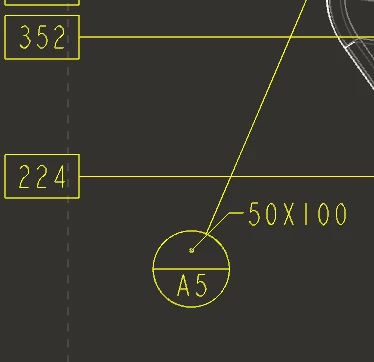
Datum Target "outside" size position

  • September 22, 2023
  • 2 replies
  • 1624 views

IS there any way to reposition the SIZE callout of a datum target balloon?   So for this example, is there a way to move the "50X100" so that things are clearer?
Pkoren_0-1695389482542.png


2 replies

Community Moderator
September 28, 2023

Hi Pkoren,

Thank you for your question. 
I’d like to recommend to bring more details and context to your initial inquiry.  Like the Product name, version and date code details could also be important.

This will increase your chances to receive meaningful help from other Community members. 

Regards,

Community Moderation Team.

Pkoren7-BedrockAuthor
7-Bedrock
September 28, 2023

Thanks...   I cannot see how these things would mater, but this is for CREO Parametric, Version  8.0.5.0.

StephenW
23-Emerald III
September 28, 2023

I haven't found a way to move the text within the target. I usually just try to position the balloon in a way it seems to work.

At a previous employer, they developed custom symbols for the datum targets. Maybe this was one of the reasons, I am not sure.

Pkoren7-BedrockAuthor
7-Bedrock
September 28, 2023

Yes, I have seen a few statements in presentations/documentations that the target area is at a "fixed length and angle".   So I am thinking it is NOT adjustable, but thought I would ask the Community...

StephenW
23-Emerald III
September 28, 2023

Definitely a good question! I hope someone else has a solution. If you don't get a solution, you can post an "Idea" https://community.ptc.com/t5/Creo-Parametric-Ideas/idb-p/creoparametric

Don't expect any changes, but maybe, just maybe someone is listening! I'm hoping one of these days PTC will do a good overall usability upgrade that will catch a lot of these annoyances!
