Surfacing Newbie - Create a surface from sketches contained within an outline curve
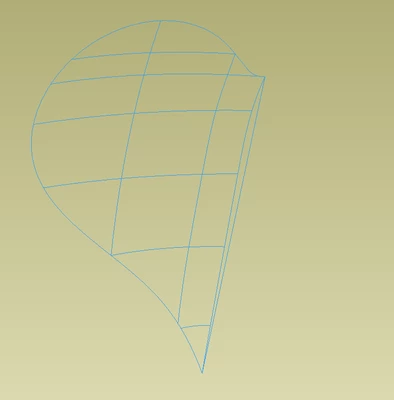
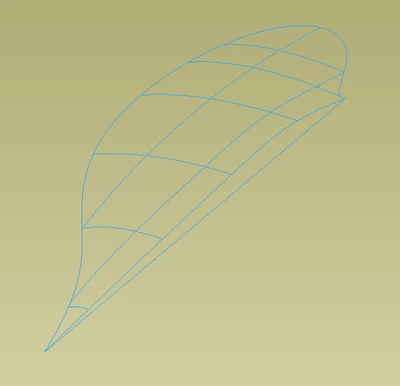
I'm very new at compound surfaces. I'm using Creo 9 and I'm trying to create a surface from a sequence of curves shown in the first few pictures.
In the past I've been successful with using boundary blend to get a basic surface that I need. However this case is more complicated than normal in that not only do I have 2 directions of curves I also have an outline it needs to extrapolate to.
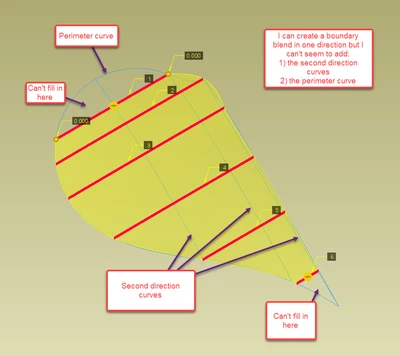
The next picture is a successful boundary blend in one direction (it fails when I try to add in the secondary direction curves) but as you can see it spills out over the perimeter in some locations and doesn't fill in the perimeter in others. To be honest I'm not really sure how to add in the perimeter curve as a constraint.
This next picture is the closest I've gotten to a fully filled in outline by selecting the curves in the other direction from the picture above and adding in a selection of the perimeter. The result as you can see is not desirable as the surfaces have several folds in the them. I know boundary blend is sensitive to the start point and end point sequence of each selected curve which I suspect is my problem here.
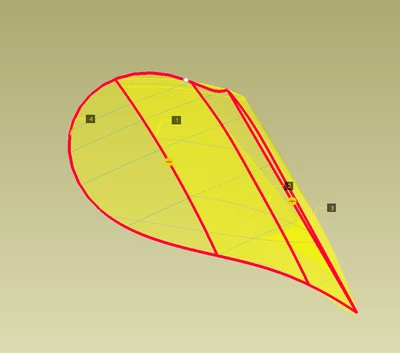
What I'm really looking for is just some tips on the sequence of tools I need to use and any things to watch out for in order to achieve a nicely blended continuous surface. Am I heading down the right track with boundary blend or am I way off base?
Edit:
Note I've viewed this video and still can't get things to work out how I want.
https://www.youtube.com/watch?v=12CYdjy3LUk
Cheers,
Airfix.