
14-Alexandrite
May 9, 2024
Solved

Would you know waht are these items?

  • May 9, 2024
  • 4 replies
  • 2148 views

Hello, I have some performance issues with Creo working with Windchill:

When I open an assembly 3D model with Windchill, sometimes it takes a very long time (about 15 minutes), but other times it is quite fast.

So, I checked the trail file to find out what happened when Creo opened slowly.

The trail file shows:
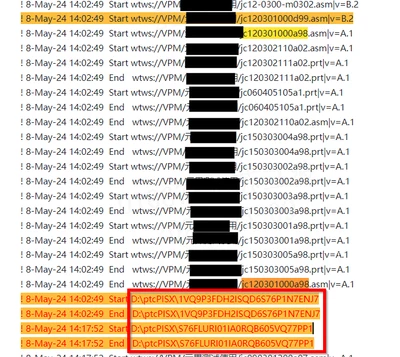
Sulibo_0-1715235250377.png(the codes are changed verytime)

After Creo loads "jc120301000a98," it tries to load some items from my local disk, taking 15 minutes.

My questions are:

  1.  What are these local items?
  2. Why does Creo try to load them from my local file system (the directory is where my "config.pro" is located)?
  3. Why does it sometimes take a long time and other times load very fast? Is there a method to avoid the long loading times?
  4. When I try to open this assembly 3D model in a local folder, Creo also tries to load these items.

And here is the structure tree:
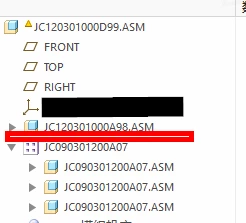
Sulibo_2-1715237431258.png


Best answer by Sulibo

Hello, @vnamboodheri 

We havent find the reason, why Creo seems sleeping when loading these kind of items.

But we find a sloution can avoid that happen(still dont know reason):

1. Use "open representation" when you open a large assembly model;

2.choose "define a new representation ";

3.and choose exclude everything;

4. when load successful;

5.choose load "Master Rep", laoding the model.


Like walk in mists , we dont know why and how that working,

But that issue never happened till now when we use this method to large assembly model.

Hope can have some helps for other teams.

br.


4 replies

24-Ruby III
May 9, 2024

Please specify which software versions you are using.

Sulibo14-AlexandriteAuthor
14-Alexandrite
May 9, 2024
  • It is Creo Parametric 5.0
23-Emerald III
May 9, 2024

I'm on Creo 6 and windchill. I see similar in my trail file. I don't know what those are. You would probably have to ask PTC specifically.

From a loading time perspective, here are my thoughts:

1. Creo installs that are on the network instead of local installs are generally expected to be slower (this may not be much of a difference)

2. Large workspaces will load significantly slower. 

3. too many workspaces will cause issues

4. Model errors/warnings/failures will significantly impact loading times.

5. Assembly features will significantly impact loading times (i haven't tested this specifically in a long time but I don't expect it has changed)

6. old workspaces tend to be problematic, especially from before windchill updates


I'm sure there are a huge number of other reasons for slow loading.


Had to blur a couple of spots due to a customer name.

StephenW_1-1715270701404.png


Chris3
21-Topaz I
May 10, 2024

May not be immediately helpful, but in Creo 11 there is a way to turn on a regeneration report that outputs how long everything takes to regen.


https://support.ptc.com/help/creo/creo_pma/r11.0/usascii/index.html#page/whats_new_pma/asm_performance_reporting.html 

Community Moderator
May 16, 2024

Hello @Sulibo


It looks like you have some responses from some community members. If any of these replies helped you solve your question please mark the appropriate reply as the Accepted Solution. 

Of course, if you have more to share on your issue, please let the Community know so other community members can continue to help you.

Thanks,
Community Moderation Team.

Sulibo14-AlexandriteAuthorAnswer
14-Alexandrite
May 24, 2024

Hello, @vnamboodheri 

We havent find the reason, why Creo seems sleeping when loading these kind of items.

But we find a sloution can avoid that happen(still dont know reason):

1. Use "open representation" when you open a large assembly model;

2.choose "define a new representation ";

3.and choose exclude everything;

4. when load successful;

5.choose load "Master Rep", laoding the model.


Like walk in mists , we dont know why and how that working,

But that issue never happened till now when we use this method to large assembly model.

Hope can have some helps for other teams.

br.


Community Moderator
May 24, 2024

Hello @Sulibo,


Thank you for documenting the solution here.
It will surely help others who face similar issues to try out your steps.


Appreciate your help.


Regards,

Community Moderation Team.