6-Contributor
May 12, 2025
Solved

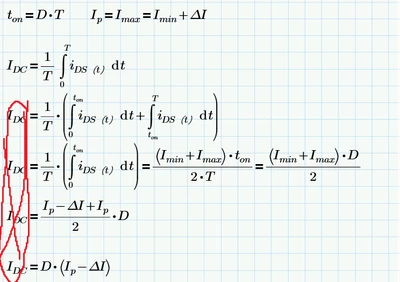
How can I use the newline equal sign just like a handwritten derivation process
  • May 12, 2025
  • 3 replies
  • 1438 views

EthanZ_0-1747040677109.png

I hope I can write the derivation process of a formula, like this

IDC = xxxxxxxxxxxxxxxxxxxxxxxx

       = xxxxxxxxxxxxxxxxxxxx

       = xxxxxxxxxxxxxxxx

Best answer by Werner_E

> How can I use the newline equal sign just like a handwritten derivation process

Short answer: You can't.


Prime is not an equation editor like you have available in word processors, so it lacks formatting capabilities like the one you are looking for.
Prime is made for doing Math on its own and less for displaying what you did manually.
The line breaks therefore are only available for the four basic arithmetic operations, not a boolean/comparison equal.
The fat  Boolean equal you are using is meant to compare LHS and RHS and evaluate to 0 or 1 resp. but it can be misused to show a formula used for subsequent calculations (in real Mathcad = MC15 and below this fat equal sign could also be edited to look like a normal one, in Prime that's not possible to do).

So at the time being you can only hope for a suitable workaround and you will have to use separate math regions (which you may put inside one larger text region) and not just one.

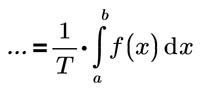
You could try to use something less obvious on the left hand side of the second and the subsequent regions like a variable name consisting of, lets say, three dots.
Werner_E_0-1747053033838.png
And before you ask - no, Prime does not allow variable names with (invisible) spaces.

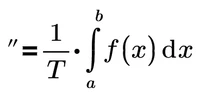
But you may look for other characters which may better suits your needs
Werner_E_1-1747053592837.png

Werner_E_2-1747053599589.png

Of course you could also leave the LHS empty and Prime will show a light gray rectangle as placeholder

Werner_E_3-1747053725336.png

You may also replace the fat equal by a normal one
Werner_E_7-1747054909875.png
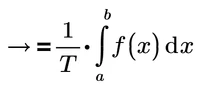
Here the variable name consists of the arrow AND the normal equal character and is followed by an implicit (invisible) multiplication (Ctrl-Shift-U) which PTC calls the 'scaling operator'. You will also find that operator in the "Operators" menu, section "Engineering".


Next problem will be to vertically align all equal characters. Guess it will be hard to position the subsequent regions so that the position the first region equal will line up.


BTW, you create a variable name using an unusual character by starting with double quotes as if creating a string

Werner_E_4-1747054357473.pnginsert the character(s) either by typing or from charmap

Werner_E_5-1747054589906.pngand after the last character type DEL to delete the quotes

Werner_E_6-1747054648088.png

Spaces are not allowed - Prime would refuse to delete the quotes if you use spaces.


A workaround which is not recommended:

You can change the color of the rectangle which Prime uses for placeholders.

Open the undocumented properties menu by Pressing the four keys Ctrl-Shift-Alt-Q at the same time and change the color of "ScopeColor" to "Transparent".

Werner_E_0-1747056268022.png

So by letting the LHS of a Boolean comparison empty it now looks like

Werner_E_1-1747056332119.png

but it also affect other placeholders like the ones you see when you create a multiplication.

So I won't suggest fiddling around with these properties. After all its not documented and can be changed without notice in future versions.


3 replies

Werner_E25-Diamond IAnswer
25-Diamond I
May 12, 2025

> How can I use the newline equal sign just like a handwritten derivation process

Short answer: You can't.


Prime is not an equation editor like you have available in word processors, so it lacks formatting capabilities like the one you are looking for.
Prime is made for doing Math on its own and less for displaying what you did manually.
The line breaks therefore are only available for the four basic arithmetic operations, not a boolean/comparison equal.
The fat  Boolean equal you are using is meant to compare LHS and RHS and evaluate to 0 or 1 resp. but it can be misused to show a formula used for subsequent calculations (in real Mathcad = MC15 and below this fat equal sign could also be edited to look like a normal one, in Prime that's not possible to do).

So at the time being you can only hope for a suitable workaround and you will have to use separate math regions (which you may put inside one larger text region) and not just one.

You could try to use something less obvious on the left hand side of the second and the subsequent regions like a variable name consisting of, lets say, three dots.
Werner_E_0-1747053033838.png
And before you ask - no, Prime does not allow variable names with (invisible) spaces.

But you may look for other characters which may better suits your needs
Werner_E_1-1747053592837.png

Werner_E_2-1747053599589.png

Of course you could also leave the LHS empty and Prime will show a light gray rectangle as placeholder
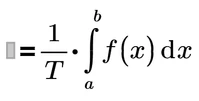
Werner_E_3-1747053725336.png

You may also replace the fat equal by a normal one
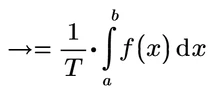
Werner_E_7-1747054909875.png
Here the variable name consists of the arrow AND the normal equal character and is followed by an implicit (invisible) multiplication (Ctrl-Shift-U) which PTC calls the 'scaling operator'. You will also find that operator in the "Operators" menu, section "Engineering".


Next problem will be to vertically align all equal characters. Guess it will be hard to position the subsequent regions so that the position the first region equal will line up.


BTW, you create a variable name using an unusual character by starting with double quotes as if creating a string

Werner_E_4-1747054357473.pnginsert the character(s) either by typing or from charmap
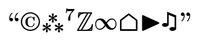
Werner_E_5-1747054589906.pngand after the last character type DEL to delete the quotes

Werner_E_6-1747054648088.png

Spaces are not allowed - Prime would refuse to delete the quotes if you use spaces.


A workaround which is not recommended:

You can change the color of the rectangle which Prime uses for placeholders.

Open the undocumented properties menu by Pressing the four keys Ctrl-Shift-Alt-Q at the same time and change the color of "ScopeColor" to "Transparent".
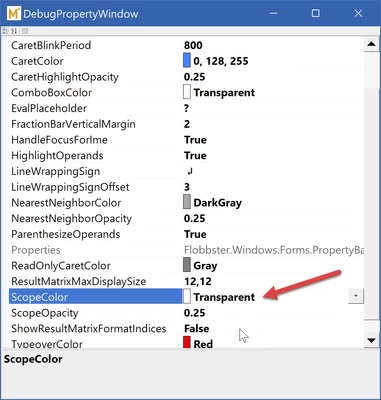
Werner_E_0-1747056268022.png

So by letting the LHS of a Boolean comparison empty it now looks like
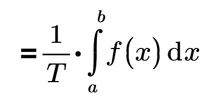
Werner_E_1-1747056332119.png

but it also affect other placeholders like the ones you see when you create a multiplication.

So I won't suggest fiddling around with these properties. After all its not documented and can be changed without notice in future versions.


Community Moderator
May 20, 2025

Hello @Ethan.Z


It looks like you have some responses from our community experts. If any of these replies helped you solve your question please mark the appropriate reply as the Accepted Solution. 

Of course, if you have more to share on your issue, please let the Community know so other community members can continue to help you.

Thanks,
Vivek N.
Community Moderation Team.

14-Alexandrite
May 12, 2025

If you are trying produce an infrequent article or paper, you can edit your PDF afterwards.

Use a unique variable name that you repeat for all your equations where you want to remove the left hand side.  Then edit your PDF and do a search & replace for that variable.


If you are producing a Mathcad sheet for regular use, this would be a bit tedious.  Alternatively you can edit an existing "mathy" looking Windows font and make an easily accessible character to be a blank space.  Mathcad would just think it is a regular variable. 

ttokoro
21-Topaz I
21-Topaz I
May 21, 2025

= is a variable name.

image.png

t.t.