

Output Mathcad Matrix to Excel with VBA
Using Prime 9.0
Hello,
I have an Excel program with VBA code. When you click the "Calculate This Tab" button, it configures the input values in the designated Mathcad sheet (relative file path in cell D3) , and calculates the outputs accordingly. The point is that these values can easily be changed from Excel and the outputs are calculated based on the latest values and outputted back to Excel. The real program is working on a much larger scale, but I created a small scale version for simplicity here.
The problem I am having is when trying to output a Matrix back to Excel. I have not been able to get it to work in a seamless way. One thing I have tried is writing the Matrix output to a temporary csv file and then importing the data into excel through a sub function defined in the VBA code. This sort of works, but the problem with this is that the WRITECSV() function in Mathcad does not update when I run the macro from Excel even if I assign it as an Output like the others. I have to manually go into the Mathcad sheet and make sure it re-calculates to output the right data which essentially defeats my goal of using the Excel-macro interface to automate this process. In the VBA code, I am clearing the temp csv file after importing because I'd like to ensure the matrix output is based on the latest values in the excel and is not still showing an output from a previous configuration.
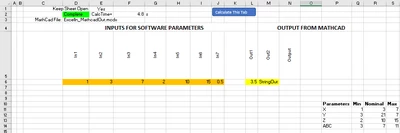
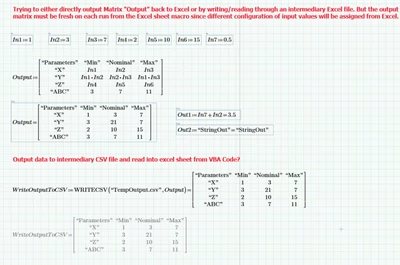
I am open to other suggestions on how I can better get the matrix output to my excel sheet if there is a better way of outputting the "Output" matrix to Excel directly instead of using the intermediary csv file, I just wasn't sure how else to do it.
I'd appreciate any help with this and let me know if anything needs more clarification. I attached the zip folder with the files.