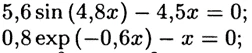
You may use the symbolic "solve" command to solve these equations in Mathcad.
Or you may use a solve block with "find"
Or you may use the "root" function.
Look them up in the help, give one of them a try and if you experience problems then come back here and post your worksheets with your attempts.
I would advise against using the symbolic "solve". In case of your first function it would return only the trivial solution x=0. Using one of the numeric methods you get the other two solutions as well if you provide appropriate guess values.
If you really need it to be done using the simple bisection method for trainings purposes in your education, you have to look up the method in your lecture notes. You should not need Mathcad to do so other than for plotting to find suitable start values and to evaluate the functions numerically to see where the sign changes.
Of course you could write a Mathcad function wich takes the function and two initial values as its arguments and returns a list of left and right boundary values (until a certain precision is achieved). If this is your goal, then make a start, give it a try and if you get stuck, come back here and post your worksheet with your attempts.
It looks like you have some responses from some community members. If any of these replies helped you solve your question please mark the appropriate reply as the Accepted Solution.
Of course, if you have more to share on your issue, please let the Community know so other community members can continue to help you.