
10-Marble
May 31, 2025
Solved

Use find to solve a iteration

  • May 31, 2025
  • 4 replies
  • 1200 views

Hello users of Mathcad : ), user of Mathcad Prime 10.0

Here is a picture of my problem. I am trying for days to solve it, I just don't understand why it won't work. I need it for a homework.
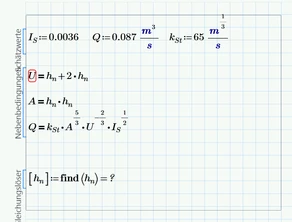
SO_10687563_0-1748725169743.png

So, I’m working with a rectangular channel where the flow area is A = b × hn. The problem is that I don’t know either b or hn, so to make things simpler, I just assumed the cross-section is square – meaning b = hn. That way, I only have one variable to figure out.

I then rewrote the whole discharge formula so that everything (A, U, etc.) depends only on hn. All the other values like the slope and the Strickler coefficient are given.

Once I find the hn that gives me the correct flow rate Q, I can always scale it afterwards, like double hn to get b and turn it back into a rectangle if needed. The most important thing is that the flow stays the same.

So theoretically, this should work fine, but Mathcad won’t solve it, and I’m trying to figure out what’s going wrong.

Thanks for any help.


Best answer by terryhendicott

Hi,

See the following file.

It uses a paramatized solve block where the find is made a function.

Cheers

Terry

4 replies

21-Topaz II
June 2, 2025

Hi,

See the following file.

It uses a paramatized solve block where the find is made a function.

Cheers

Terry

21-Topaz II
June 2, 2025

Hi,

I am using express version at the moment. Waiting on new license for Prime 11.  So can't show you a solve block but can describe what to do.

Capture3.JPG

25-Diamond I
June 2, 2025

You have three equations, but only one variable to look for. This usually can't work.


One option is to turn the first two equations into functions of hn -> A(hn):=... and U(Hn):=....

You should put these two function definitions in front of the solve block as well as the definition of the variables IS, Q and kSt.

In the solve block a guess value for hn is missing! You may use hn := 1m

At the end remove the square brackets around hn. Simply write hn := find(hn)


As you are just looking for one variable another option is to use the "root" function in one of its two flavors instead of the solve block with "find".

Here is a way how to do it. For convenience reasons I defined a function "flowrate" but you could use the expression directly in the root command as well.

Werner_E_1-1748864279009.png


BTW, a third option which I won't recommend is to use the solve block with all three equations as you had them setup.

Move the three variable definition outside the solve block and above it.

Provide guess values for all three variables hn, A and U at the top of the solve block and at the end let the Prime look for all three variables by writing

Werner_E_0-1748863796833.png


BTW, a function "flowrate" might also be useful to demonstrate the behaviour of the flowrate with respect to the value of hn

Werner_E_2-1748865734444.png


Important! For future question always attach the worksheet itself, not just a picture which does not even show which error message you get (presumably "variable not defined").


@SO_10687563 wrote:
...

Once I find the hn that gives me the correct flow rate Q, I can always scale it afterwards, like double hn to get b and turn it back into a rectangle if needed.


Not sure how you would do so!??

In case you think that you only have to keep the area constant (double hn and use hn/2 for b) this would be wrong as the flowrate seems not only be dependent on the cross-sectional area.

The relationship between h and b is shown here

Werner_E_0-1748874983290.png

The green trace is the correct one and its based on an equation of fifth order.

The blue trace only lets the cross sectional area constant (so we see a simple hyperbola), but because the circumference is changing, flowrate will not be kept constant that way.

To give a numeric example. If you double hn -> h=63.238 cm, the correct value for b would be b=18.746 cm. If you simply keep the area constant, you would end up with just 15.81 cm!

Werner_E_3-1748875888641.png

The highlighted function shows how you could get the b-value for any given value of h using the "root" function.
Of course you also use "root" with a guess value or a parametrized solve block function as shown in Terry's first reply.

And sure you can also modify it to let you calculate the correct h-value for any given b.

Check the function for the flow rate! I have no experience in your field of work and only guessed from your initial posting ...


23-Emerald I
June 2, 2025

Terry has done a good job of pointing out that you need to learn how to use Mathcad.


But if I look at your picture:

Fred_Kohlhepp_0-1748863577693.png

Your equation doesn't balance.


And if I web search "Strickler coefficient," I can quickly find a wikipedia page, https://en.wikipedia.org/wiki/Manning_formula#Hydraulic_radius that shows this problem's math.  There are two quantities that you need to address: a hydraulic radius, and the hydraulic gradient.  (The hydraulic radius allows you to develop the "non-square" channel.)


10-Marble
June 2, 2025

Still a beginner in Mathcad : ), they sadly don't teach us how to use Mathcad, they only give us the license and we have to figure it out ourselfs. I got the equations all from the scripts of my subject. Next time I will send the file as well. First time usind the chat, didn't even know if that was possible to send the file. Also about the hydraulic radius. My equation can be either with the hydraulic radius or not (this is from my script.):


SO_10687563_0-1748893342989.png


But do you mean mathematically I need the equation with the radius, to make it a "non-sqare" shape?

Thank you for the reply. 

23-Emerald I
June 6, 2025

This topic has set stagnant for a few days, I will assume that any homework related deadline have past.  (There's a convention in this forum:  help with Mathcad , don't just give the  solution.)


I started  working this problem (using Express version 4) just to see if I could solve for non-square dimensions without a solve block.  The answer is "not really," but if you set a width you can solve for a water depth for a given flow rate.  That led to the optimum channel size for a given flow rate, and an investigation into the effects of channel shape.


Assuming that by now the homework has been turned in, attached find my ramblings.

Community Moderator
June 6, 2025

Hello @SO_10687563


It looks like you have some responses from our community champions. If it helped you solve your question, please mark the appropriate reply as the Accepted Solution. 

Of course, if you have more to share on your issue, please let the Community know so other community members can continue to help you.

Thanks,
Vivek N.
Community Moderation Team.

10-Marble
June 8, 2025
Hello,

The thing is I see no solve button 😕

I am trying to mark it as solved, but I don't see were.

Best regards,

Sarah

23-Emerald IV
June 8, 2025

In the 'three dots' pop-up menu (left of the translation symbol) there should be an option to mark the specific response as solution.


Success!
Luc