
1-Visitor
December 28, 2017
Solved

bind database output to a table

  • December 28, 2017
  • 1 reply
  • 2351 views

Hi All,

How can I bind my query result service into a table?
And wich table should I use?
Any tips?

Thanks,

Anselmo.

Best answer by khayes1

Hi Anselmo,

you should be able to drag the All Data result from your query service onto a grid widget.
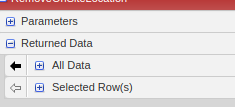
You can then configure the grid widget to show the columns of data you are interested in.

K

1 reply

khayes11-VisitorAnswer
1-Visitor
December 29, 2017

Hi Anselmo,

you should be able to drag the All Data result from your query service onto a grid widget.

You can then configure the grid widget to show the columns of data you are interested in.

K

asaito-31-VisitorAuthor
1-Visitor
December 29, 2017

Hi Kieron,

The configure part that remains a mistery...
My configure grid colunms has nothing to select and I have no clue of what to do in the page below:

Thanks,

Anselmo.

1-Visitor
December 29, 2017

Hi,

on the actual grid widget, in the top left corner is a drop down arrow

Hover over it and one of the options you will see is 'configure Grid Columns'. Select that and you will be presented with a new window which allows you do define the order of the columns (drag to order), and also allows you to configure how the data is rendered, columns are named etc.

Hope that helps,

K