
19-Tanzanite
July 4, 2023
Solved

Custom CSS new syntax for specific button

  • July 4, 2023
  • 3 replies
  • 4168 views

Hi 


I'm trying to follow the new custom CSS syntax for Part

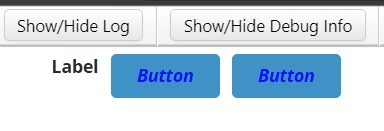
@supports (ptcs-style-unit: "PTCS-BUTTON.primary") {
 [part=label] {
 color: Blue;
 font-style: Italic; 
 }
}


Which affects all the buttons in the mashup 
Velkumar_0-1688458924405.png


How to apply this custom CSS for specific button using CustomClass property 


Thanks in advance


/VR
Best answer by TonyZhang

Hi @Velkumar 

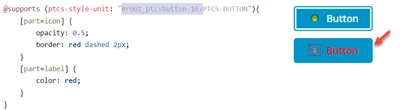
You can use the DOM element ID to target a specific button rather than applying to all buttons.

Find out the ID from browser developer tool.


Use ptcs-style-unit: "elementID.PTCS-BUTTON"

TonyZhang_0-1689039196738.png


Note that this syntax doesn't support class name to target the component for now, it's in the backlog and might be realized in the future.

3 replies

12-Amethyst
July 5, 2023

There is no example of how this would work. I don't believe it works at all.

More than that, I get an error saying my "CSS contains errors.", yet there is nothing in the CSS editor to say anything about said errors, and EVEN worse, the CSS is the exact one in the documentation. Doesn't let me save the mashup because "CSS contains errors" and to save it you have to "View Mashup".


Getting this message is kind of amazing:


Applying custom CSS can make it more difficult to migrate your styles when upgrading to future versions of ThingWorx. Use style themes or widget style properties instead. Read more


These features are so uselessly locked by using web-components for widgets.


I would stick with the old way of styling with CSS for these web-components.:

.myButton ptcs-button::part(root) {
  background-color: red;
  border-color: blue;
  border-width: 2px;
}

Velkumar19-TanzaniteAuthor
19-Tanzanite
July 5, 2023

Hi @GabrielB 


We are still using the old method but for some widgets old syntax is not working. 


For your issue, just turn off the linting option to save it.


I'm just exploring this new syntax 


/VR


Velkumar19-TanzaniteAuthor
19-Tanzanite
July 5, 2023

@VladimirN @PaiChung @slangley  Could you please help me on this issue / requirement 

Velkumar19-TanzaniteAuthor
19-Tanzanite
July 6, 2023

@VladimirN  Thanks for sharing this document. But I'm looking to implement new CSS syntax for specific button instead of whole buttons in mashup

TonyZhang16-PearlAnswer
16-Pearl
July 11, 2023

Hi @Velkumar 

You can use the DOM element ID to target a specific button rather than applying to all buttons.

Find out the ID from browser developer tool.


Use ptcs-style-unit: "elementID.PTCS-BUTTON"

TonyZhang_0-1689039196738.png


Note that this syntax doesn't support class name to target the component for now, it's in the backlog and might be realized in the future.

Velkumar19-TanzaniteAuthor
19-Tanzanite
July 11, 2023

Hi @TonyZhang 


It works perfectly. Thanks 🙂


/VR