

1-Visitor
November 20, 2017
Solved

Expression Changed event

  • November 20, 2017
  • 7 replies
  • 4634 views

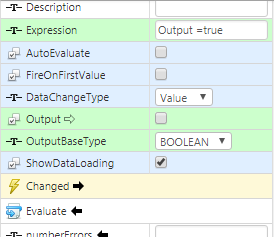
Hi. I'm trying to open a popup mashup only if a parameter that I pass to a expression widget have certian value. So, i added the widget to the mashup and binded the changed event to the "navigate" service on my navigation widget but it doesn't work, i also selected on the DataChangeType dropdown  the "value" option, with no success. Thank You for your time. I attached a picture with the configuration of the expression widget.
output.png

Best answer by AdamR

Hi Eddison,

It sound like for what you are trying to accomplish a Validator widget may be better.  This allows a true/false check and will trigger every time the expressions returns true.

Thanks,

Adam

7 replies

1-Visitor
November 20, 2017

Few things: - Output it's an input parameter of the expression widget? - Output=true --> You are assigning true to Output, I think your code should be Output==true ( comparision ) - You have "FireOnFirstValue"=false, that means it won't trigger data change the first time it's evaluated - I see that you have evaluate binded, then it seems this part it's ok, otherwise you will have to set AutoEvaluate=true Best Regards, Carles.

1-Visitor
November 20, 2017

Hi Carles, thanks for the response.

Yes, I know i'm assigning the value "true" to Output just to force the change, if i check the FireOnFirstValue it trigger the change but only once, after that it won't trigger again, i checked the AutoEvaluate but it doesn't trigger anyway.

1-Visitor
November 20, 2017

It should works, there should be other wrong things, but the value changes or you are just evaluating it with the same value? if that the case you can change it the DAtaChangeType to Always.

AdamR14-AlexandriteAnswer
14-Alexandrite
November 20, 2017

Hi Eddison,

It sound like for what you are trying to accomplish a Validator widget may be better.  This allows a true/false check and will trigger every time the expressions returns true.

Thanks,

Adam

1-Visitor
November 20, 2017

Hi, Adam. Thank Your for the reply.. I'll try that tomorrow and tell you if it worked.