

1-Visitor
October 27, 2017
Solved

From INFOTABLE to QueryPropertyHistory

  • October 27, 2017
  • 6 replies
  • 5795 views

Hi i would like to insert my infotable data to QueryPropertyHistory service.

This is my data from my service.
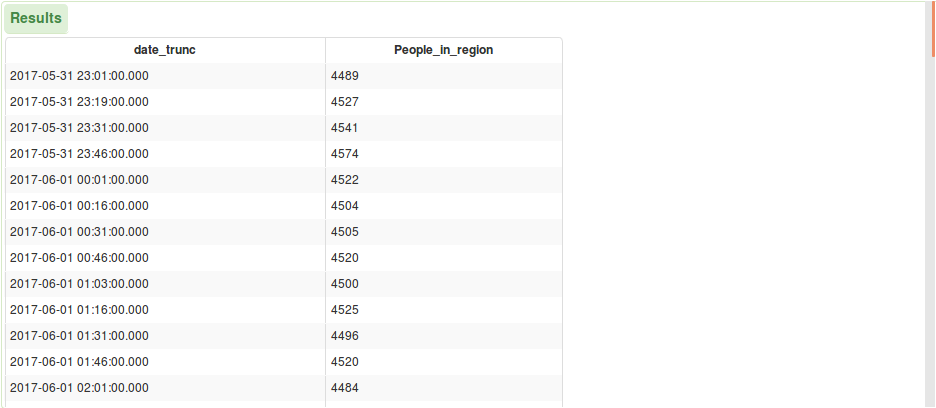
Screenshot-2017-10-27 ThingWorx Composer.png

My thing Properties:

Screenshot-2017-10-27 ThingWorx Composer(1).png

My Value Stream Properties:

Screenshot-2017-10-27 ThingWorx Composer(3).png

My service code:

var params = {

    path: "k.csv" /* STRING */,

    columnMappings:"date_trunc;People_in_region",

    hasHeader: true /* BOOLEAN */,

    dateFormat: "dd.MM.yyyy HH:mm" /* STRING */,

    fileRepository: "SystemRepository",

    fieldDelimiter: ";" /* STRING */,

    stringDelimiter: "\"" /* STRING */,

    dataShape: "TFPeopledata" /* DATASHAPENAME */

};

var result = Resources["CSVParserFunctions"].ReadCSVFile(params);

The problem is when I execute the generic service "QueryPropertyHistory", I get nothing as result.

Screenshot-2017-10-26 ThingWorx Composer(3).png

Best answer by DD_7886593

I have changed little bit in the code to get the result of service as an infotable:

var params = {

    path: "k.csv" /* STRING */,

    columnMappings:"date_trunc;People_in_region",

    hasHeader: true /* BOOLEAN */,

    //longitudeField: undefined /* NUMBER */,

    dateFormat: "dd.MM.yyyy HH:mm" /* STRING */,

    fileRepository: "SystemRepository",

    //latitudeField: undefined /* NUMBER */,

    fieldDelimiter: ";" /* STRING */,

    stringDelimiter: "\"" /* STRING */,

    dataShape: "TFPeopledata" /* DATASHAPENAME */

};

var res = Resources["CSVParserFunctions"].ReadCSVFile(params);

var result = Resources["InfoTableFunctions"].CreateInfoTableFromDataShape({infoTableName : "InfoTable",dataShapeName : "NamedVTQ"});

for each (var row in res.rows) {

    var newEntry = new Object();

    newEntry.name = "People_in_region";

    newEntry.time = row.date_trunc;

    newEntry.value = row.People_in_region;

    newEntry.quality = "GOOD";

    result.AddRow(newEntry);

}

var values = result;

var params = {

    values: values

};

me.UpdatePropertyValues(params);

Screenshot-2017-10-27 ThingWorx Composer(4).png

That's so great !


But when I run QueryPropertyHistory service, I get this result.

Screenshot-2017-10-27 ThingWorx Composer(5).png

The "date_trunc" values are not the same.

My objective is to work on startDate and endDate with the QueryPropertyHistory values.

6 replies

5-Regular Member
October 27, 2017

If I understand what you are trying to do correctly, you want to take the infotable values and make them available as part of the QueryPropertyHistory service?

If so, do you have a Value Stream property set in the General Information section of the Thing? Then all you need to do is loop through your InfoTable and use the service UpdatePropertyValues.

Something like this should work:

infotable = //your infotable here

var values = Resources["InfoTableFunctions"].CreateInfoTableFromDataShape({infoTableName : "InfoTable",dataShapeName : "NamedVTQ"});

for each (var row in infotable.rows) {

    var newEntry = new Object();

    newEntry.name = "People_in_region";

    newEntry.timestamp = row.date_trunc;

    newEntry.value = row.People_in_region;

    newEntry.quality = "GOOD";

    values.AddRow(newEntry);

}

var params = {

values: values;

};

me.UpdatePropertyValues(params);

1-Visitor
October 27, 2017

Hi James, Thank you,

The problem that I don't get all my data values, just a few of them.

Also should I put DataChange as "Value" or "on" ?

5-Regular Member
October 27, 2017

In this case you want DataChange as "Always", since you want to log the property even if the value is the same as it was before, but it shouldn't matter if the example data set you provided was the full set -- they are all unique values -- it's very strange if you are not getting all of the values in this case. Could you try setting data change to "Always" and running the service again?