
April 29, 2017
Solved

How can I bind the session variable to dropdown list?

  • April 29, 2017
  • 7 replies
  • 5606 views

How can I bind the session variable to dropdown list? Is it only a one way binding?

But in Text box, it works fine.

    Best answer by posipova

    I have a dropdown list on the left here and the GetGlobalSessionValues from CurrentSessionInfo service bound to it:
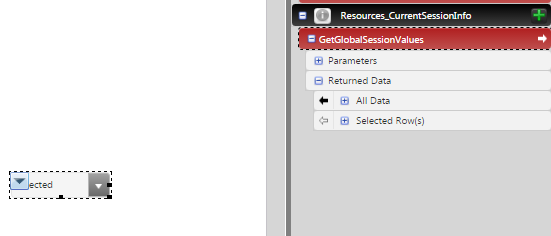
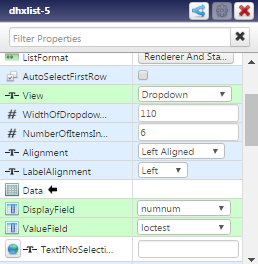
    Then i need to configure the list widget itself in the following fields:
    7 replies

    1-Visitor
    April 29, 2017

    Create a getter service on a thing that reads the data stored in your session variable and returns an infotable.  Bind the All Data from your getter service to the dropdown list.

    var result = Resources["CurrentSessionInfo"].GetGlobalSessionValues().<YourSessionVariable>;

    April 30, 2017

    How can I retain my entire mashup value( including selected values of dropdown list and "label" value) navigating from this mashup to another?

    5-Regular Member
    May 1, 2017

    Hi Bavithraa Marimuthu​,

    You can use Session variables to save the parameters and then retrieve it again. You simply need to bind the property from Selected Rows(s) of the service (which feeds the data to the Dropdown widget) with the session variable and then bind it again to selected text property of the Dropdown widget.

    I hope it helps.