

1-Visitor
December 14, 2016
Solved

How can we add keypress event in our textbox i.e whenever a key is pressed in a textbox and a values is typed it should call a web service.

  • December 14, 2016
  • 6 replies
  • 5321 views

we have a text box in which we enter some text and then on changed event of text box a service is called which posts a json and returns the data corresponding to it.

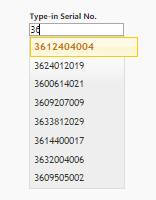
Now we want when we type just one letter or 2 or 3 letters of that string it should call the web service and give the matching result. Basically we need keypress functionality  in textbox
Best answer by nkhose

1)Firstly you can bind your webservice's Thingworx Service result as "Data"  to the autocomplete widget as we do normally for grid widget .

2)Look for the event the autocomplete widget has "Textchanged" & "Textselected" event .Bind the Textchanged event to the same service in (1)

Configuration part :

You will see the fields of infotable  in Autocomplete widget binding left nav botton give name & display values .

Give minimum length of characters  in your case 2 chanracters to fire the service on "Textchanged" event . If you want to fire

any service on selection of textbox values you can bind "Textselected" event

Let me know if you got this or anything needed on this

6 replies

1-Visitor
December 14, 2016

I think with the existing textbox widget keypress event is not possible instead any out of box way to do it , however as you say

typing 2 or 3 characters webservice should call you should try the "Autocomplete Widget" from marketplace https://marketplace.thingworx.com/Items/autocomplete surely your requirements exactly match by using it .

psaxena1-VisitorAuthor
1-Visitor
December 19, 2016

Hi Nilesh,

I downloaded the autocomplete widget,but I am not able to get that from where will the widget get suggestions when we type something in the box.I want that whatever I type should call the web service and the suggestions should be returned from the web service itself dynamically.

nkhose1-VisitorAnswer
1-Visitor
December 19, 2016

1)Firstly you can bind your webservice's Thingworx Service result as "Data"  to the autocomplete widget as we do normally for grid widget .

2)Look for the event the autocomplete widget has "Textchanged" & "Textselected" event .Bind the Textchanged event to the same service in (1)

Configuration part :

You will see the fields of infotable  in Autocomplete widget binding left nav botton give name & display values .

Give minimum length of characters  in your case 2 chanracters to fire the service on "Textchanged" event . If you want to fire

any service on selection of textbox values you can bind "Textselected" event

Let me know if you got this or anything needed on this