10-Marble
August 30, 2017
Solved

How to achieve excel like pivot functionality in Thingworx?

  • August 30, 2017
  • 2 replies
  • 3317 views

How to achieve excel like pivot functionality in Thingworx?

Tried using Pivot function, but it has limited functionality with dependency on timestamp property. So cannot achieve excel like pivot capability. Are there any other ways/options to achieve the same in ThingWorx?

var result = Resources["InfoTableFunctions"].Pivot(params);

Best answer by abhide-4

Below is a sample working code as a reference for anyone looking to generate excel like pivot table successfully in Thingworx.

//1. Get the distinct list of column1
var params = {
t: result2 /* INFOTABLE */,
columns: "split" /* STRING */
};
var UniqueSplitList = Resources["InfoTableFunctions"].Distinct(params);


//2. Get the distinct list of column2
var params = {
t: result2 /* INFOTABLE */,
columns: "stage" /* STRING */
};
var UniqueStageList = Resources["InfoTableFunctions"].Distinct(params);


//3. Create an empty infotable using the target DataShape for the desired pivot table
var params = {
infoTableName : "InfoTable",
dataShapeName : "Stage_Splits_DataShape"
};

// CreateInfoTableFromDataShape(infoTableName:STRING("InfoTable"), dataShapeName:STRING):INFOTABLE(Stage_Splits_DataShape)
var result = Resources["InfoTableFunctions"].CreateInfoTableFromDataShape(params);


//4. Loop through unique Column1 and Column2
for (var x = 0; x < UniqueSplitList.length; x++)
{
    // new row entry object
var newEntry = new Object();
    logger.warn("UniqueSplitList = " + UniqueSplitList.split + "UniqueSplitList.length = " + UniqueSplitList.length);
    newEntry.split = UniqueSplitList.split; // STRING - isPrimaryKey = true
   
    for (var y = 0; y < UniqueStageList.length; y++)
    {
   //Generate the query to count occurrences in column2 for a given value in column1
        var query2 = {
          "filters": {
            "type": "AND",
            "filters": [
              {
                "fieldName": "split",
                "type": "LIKE",
                "value": UniqueSplitList.split
              },
              {
                "fieldName": "stage",
                "type": "LIKE",
                "value": UniqueStageList.stage
              }
            ]
          }
        };

        var params = {
            t: result2 /* INFOTABLE */,
            query: query2 /* QUERY */
        };
        // result3: INFOTABLE
        var result3 = Resources["InfoTableFunctions"].Query(params);
       
        //Calculate the counts for the current row
  if(UniqueStageList.stage == "two")
            newEntry.no_two = result3.rows.length; // NUMBER
  if(UniqueStageList.stage == "three")
            newEntry.no_three = result3.rows.length; // NUMBER       
  if(UniqueStageList.stage == "four")
            newEntry.no_four = result3.rows.length; // NUMBER
       
        //Calculate the %s for the current row
        if(y == UniqueStageList.length -1 )
        {           
            newEntry.pct_two = Math.round(100 * newEntry.no_two/(newEntry.no_two + newEntry.no_three + newEntry.no_four)); // NUMBER
            newEntry.pct_three = Math.round(100* newEntry.no_three/(newEntry.no_two + newEntry.no_three + newEntry.no_four)); // NUMBER
            newEntry.pct_four = Math.round(100 * newEntry.no_four/(newEntry.no_two + newEntry.no_three + newEntry.no_four)); // NUMBER

         //Add this entire row to the result infoTable
         result.AddRow(newEntry);           
        }
    }
}
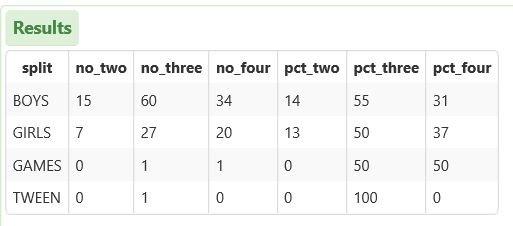
2.JPG

2 replies

1-Visitor
August 30, 2017

Not as far as I know. But you may cook data to convert non timestamp fields to timestamp field:

Category = A = new Date(0)

Category = B = new Date(1)

...

abhide-410-MarbleAuthorAnswer
10-Marble
August 31, 2017

Below is a sample working code as a reference for anyone looking to generate excel like pivot table successfully in Thingworx.

//1. Get the distinct list of column1
var params = {
t: result2 /* INFOTABLE */,
columns: "split" /* STRING */
};
var UniqueSplitList = Resources["InfoTableFunctions"].Distinct(params);


//2. Get the distinct list of column2
var params = {
t: result2 /* INFOTABLE */,
columns: "stage" /* STRING */
};
var UniqueStageList = Resources["InfoTableFunctions"].Distinct(params);


//3. Create an empty infotable using the target DataShape for the desired pivot table
var params = {
infoTableName : "InfoTable",
dataShapeName : "Stage_Splits_DataShape"
};

// CreateInfoTableFromDataShape(infoTableName:STRING("InfoTable"), dataShapeName:STRING):INFOTABLE(Stage_Splits_DataShape)
var result = Resources["InfoTableFunctions"].CreateInfoTableFromDataShape(params);


//4. Loop through unique Column1 and Column2
for (var x = 0; x < UniqueSplitList.length; x++)
{
    // new row entry object
var newEntry = new Object();
    logger.warn("UniqueSplitList = " + UniqueSplitList.split + "UniqueSplitList.length = " + UniqueSplitList.length);
    newEntry.split = UniqueSplitList.split; // STRING - isPrimaryKey = true
   
    for (var y = 0; y < UniqueStageList.length; y++)
    {
   //Generate the query to count occurrences in column2 for a given value in column1
        var query2 = {
          "filters": {
            "type": "AND",
            "filters": [
              {
                "fieldName": "split",
                "type": "LIKE",
                "value": UniqueSplitList.split
              },
              {
                "fieldName": "stage",
                "type": "LIKE",
                "value": UniqueStageList.stage
              }
            ]
          }
        };

        var params = {
            t: result2 /* INFOTABLE */,
            query: query2 /* QUERY */
        };
        // result3: INFOTABLE
        var result3 = Resources["InfoTableFunctions"].Query(params);
       
        //Calculate the counts for the current row
  if(UniqueStageList.stage == "two")
            newEntry.no_two = result3.rows.length; // NUMBER
  if(UniqueStageList.stage == "three")
            newEntry.no_three = result3.rows.length; // NUMBER       
  if(UniqueStageList.stage == "four")
            newEntry.no_four = result3.rows.length; // NUMBER
       
        //Calculate the %s for the current row
        if(y == UniqueStageList.length -1 )
        {           
            newEntry.pct_two = Math.round(100 * newEntry.no_two/(newEntry.no_two + newEntry.no_three + newEntry.no_four)); // NUMBER
            newEntry.pct_three = Math.round(100* newEntry.no_three/(newEntry.no_two + newEntry.no_three + newEntry.no_four)); // NUMBER
            newEntry.pct_four = Math.round(100 * newEntry.no_four/(newEntry.no_two + newEntry.no_three + newEntry.no_four)); // NUMBER

         //Add this entire row to the result infoTable
         result.AddRow(newEntry);           
        }
    }
}

2.JPG
