

May 8, 2017
Solved

How to display the values in 2 rows for a single cell in grid?
  • May 8, 2017
  • 9 replies
  • 5846 views

column.png

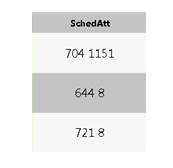
Here, I got the data for "SchedAtt" column from database. I want to display the values in 2 rows for the single cell in grid.

Eg:  "704 1151 " as    704

                                1151 within the single cell.

How to align this in grid?

Best answer by

I have found that the values can be displayed in 2 rows for a single cell by modifying the service in Javascript and rendering it with <br> in the code.

And also in "configure grid columns" , I have changed the "Column Renderer & State Formatting" into Html and "Format"  to "With Formatting"

This resolved my issue.

9 replies

5-Regular Member
May 8, 2017

Hi Bavithraa, do I understand it correctly that all that data is stored in a single column in the database table? If that's the case you'll have to post process it by splitting the values via a service.

Or else why not create a view in the database directly on that table storing the value you like to be displayed.

5-Regular Member
May 8, 2017

Hi Sushant Pandey​,

Per my understanding Bavithraa Marimuthu​ wants to insert a new line character between 704 and 1151 so that they show in different lines in the same cell.

May 8, 2017

Exacly Ankit!! I want to insert a new line character between 704 and 1151. Is there any other way to resolve this?

Answer
May 10, 2017

I have found that the values can be displayed in 2 rows for a single cell by modifying the service in Javascript and rendering it with <br> in the code.

And also in "configure grid columns" , I have changed the "Column Renderer & State Formatting" into Html and "Format"  to "With Formatting"

This resolved my issue.

5-Regular Member
May 10, 2017

Hi Bavithraa Marimuthu​,

Great! Could you please mark your answer as correct so that other members know that this Thread has a Solution?