

1-Visitor
August 28, 2017
Solved

How to get distinct rows of a grid(data table)

  • August 28, 2017
  • 13 replies
  • 6774 views

Hi Everyone,

I have two grids namely products data and projects data

If I click product one in one grid, it should show projects under this product in another grid.

how to approach this.

I have created a common key for this I am trying to access it. but i am not successful in this way.

Could anyone suggest me with the service code for it.

Regards,

nalla
Best answer by liliu

Hi Madhu,

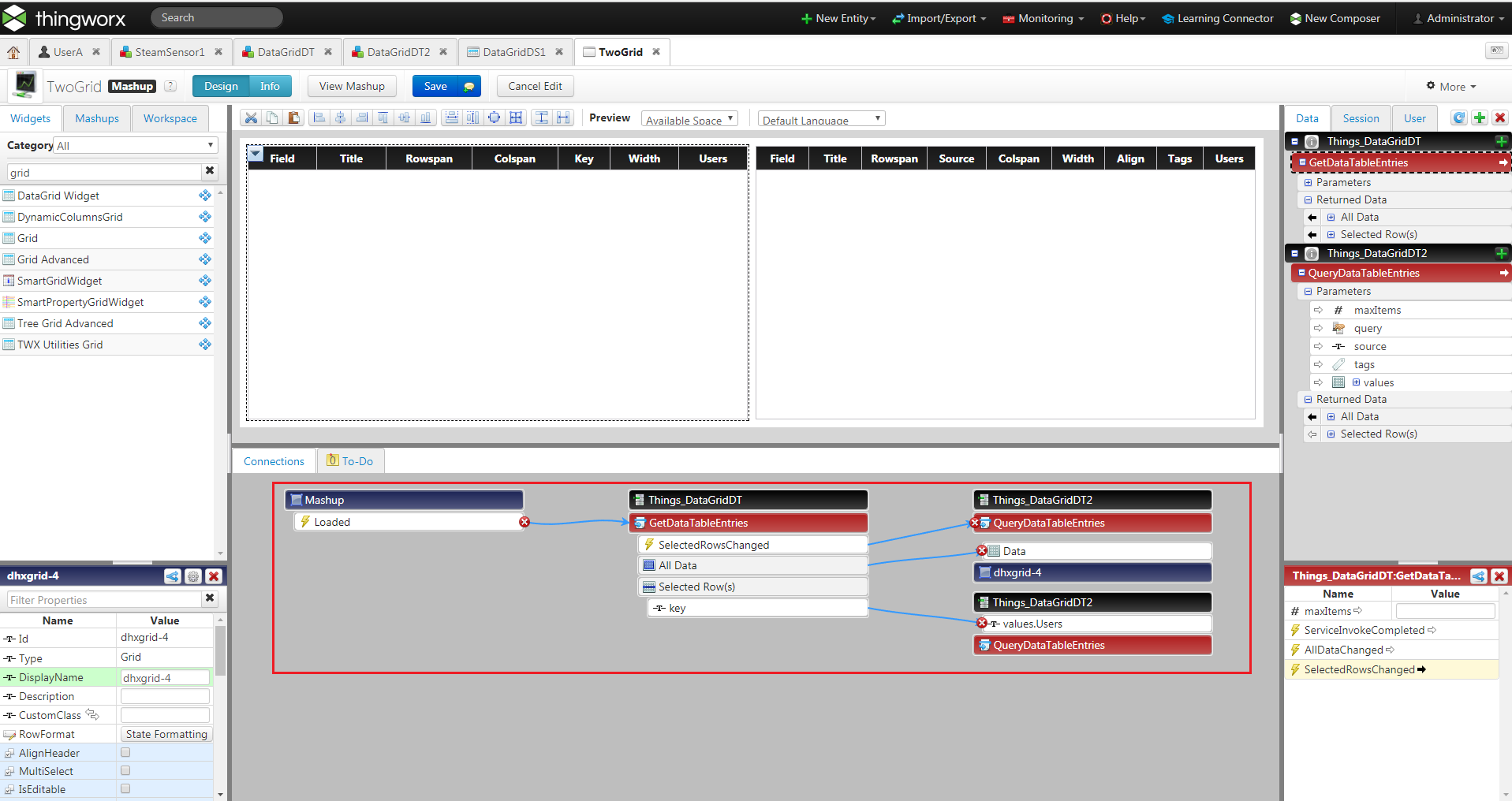
The binding is like this. First Grid is GetDataTableEntities and the second Grid is QueryDataTableEntities.

QueryDataTableEntities has parameters, bind the GetDataTableEntities's selected rows column to QueryDataTableEntities parameters.

The run tiem grid looks like this:

Should you have any concern, please let me know.

BR,

Lily

13 replies

liliu5-Regular MemberAnswer
5-Regular Member
August 29, 2017

Hi Madhu,

The binding is like this. First Grid is GetDataTableEntities and the second Grid is QueryDataTableEntities.

QueryDataTableEntities has parameters, bind the GetDataTableEntities's selected rows column to QueryDataTableEntities parameters.

The run tiem grid looks like this:

Should you have any concern, please let me know.

BR,

Lily

mnalla1-VisitorAuthor
1-Visitor
August 29, 2017

Hi Li,

ThankYou for the response. While giving connection from key to values.Users. what is the relation between this. (key to values.Users). I have tried key to my fields like name and  IssueKey but It did not show any result in the another grid.

And one more thing I would need to manipulate thousands of rows, is it going to work?  Any another methods are available, Please let me know.

Regards,

Madhu

5-Regular Member
August 30, 2017

Hi Madhu,

The key-> values.Users is something like primary key-> foreign key. It can work for thousands rows but the performance may not good.

How about you attach you mashup here and I will check what's the wrong configuration in your mashup?

Best Regards,

Lily
