
1-Visitor
September 23, 2016
Solved

I have a property of a thing of type infotable. I want to delete the entries of that infotable. How to do that.

  • September 23, 2016
  • 9 replies
  • 6586 views

I want to write a service to delete the entries of an infotable which is a property of a thing.

Best answer by rupadhyay

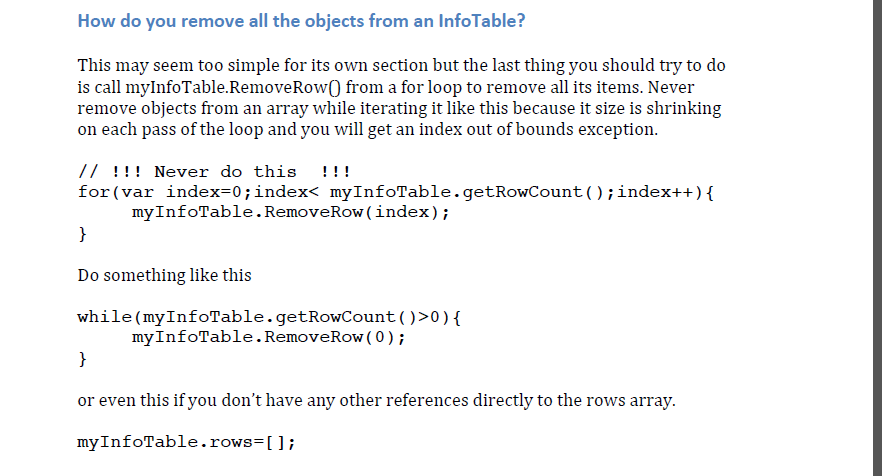
Priyanshi Saxena​ Since you already have pointed out that you are able to delete the data of info tables yourself and you are looking for PTC recommended way , I would suggest reading the below lines in the screenshot .Removing objects from info table..PNG
9 replies

1-Visitor
September 23, 2016

Hi,

There's lot's of ways to accomplish this, but you should follow some steps:

1. Clone the Infotable type property

2. Modify the cloned infotable

3. Set the Infotable property with the new cloned property.

Some code:

var copy = Resources["InfoTableFunctions"].Clone({ t1: me.infotablePropertyName });

// -- Option 1, by object

copy.Delete(yourRowValueHere);

// -- Option 2, filtering data

copy.Filter(yourRowValueHere);

// or

copy = Resource["InfoTableFunctions"].EQFilter({ t: copy, fieldName:"fieldNameToFilter", value: "value" });

// or any other Filtering options on InfoTableFunctions resource

// -- Option 3, iterating over data;

var nRows = copy.rows.length;

for (var i=0;i<nRows;i++) {

if ("rowAccompliesAConditionToDelete") {

    delete copy.rows;

    i--;

    nRows--;

  }

}

// -- And set again the property

me.infotablePropertyName = copy

psaxena1-VisitorAuthor
1-Visitor
September 23, 2016

I want to delete all the entries of the infotable, then what would be row value in following command

copy.Delete(yourRowValueHere);

1-Visitor
September 23, 2016

If you want to delete all, you can create a new Infotable with the same DataShape and set the property with it.

psaxena1-VisitorAuthor
1-Visitor
September 23, 2016

Actually my infotable contains location object which is binded to the google map. My requirement is that after every 2 minutes the infotable should be cleared and fresh entries should be displayed on the map. Presently all the entries in the infotable are displayed since the time infotable was created.

1-Visitor
September 23, 2016

Hi Priyanshi Saxena​ Even to achieve this , steps would be same as Carles Coll​ mentioned .

You have iterate these same steps everytime you want this to happen.

Steps to be iterated are :

1. Clone the Infotable type property

2. Modify the cloned infotable

3. Set the Infotable property with the new cloned property.

You can add one more steps to delete the property(info table ) once a new one is cloned.

Again if you want only changed values to be overridden in info table , then in that case , Option 3, iterating over data would be one you will need.

Or you can also use option 3 to delete all data by making the if condition true. (ie removing the condition )

// -- Option 3, iterating over data;

var nRows = copy.rows.length;

for (var i=0;i<nRows;i++) {

if ("rowAccompliesAConditionToDelete") {

    delete copy.rows;

    i--;

    nRows--;

  }

}

The codes given above are very helpful , however if you still need help in getting this done. Do let us know .

Carles Coll​ Please advise if I am wrong , your help would surely make us understand as if  which would be optimal solution in requirements like this.

Thanks in Advance !

Ravi Upadhyay