

1-Visitor
June 27, 2016
Solved

logger.info and logger.debug not working in Thingworx v6.6

  • June 27, 2016
  • 8 replies
  • 8287 views

One of the most effective ways of debugging services created in Composer is to utilize the Thingworx Monitor.  However, it seems that only logger.warn and logger.error actually log text to the monitor. Is there something special I should know when using logger.info and logger.debug snippets to have them log to monitor thread?

Thank you ahead of time!
Best answer by CarlesColl

Hi Christopher,

Maybe either I was clear Please, read my post, and do what it says there:

Captura de pantalla 2016-06-29 08.05.56.png

8 replies

1-Visitor
June 28, 2016

Hi Christopher,

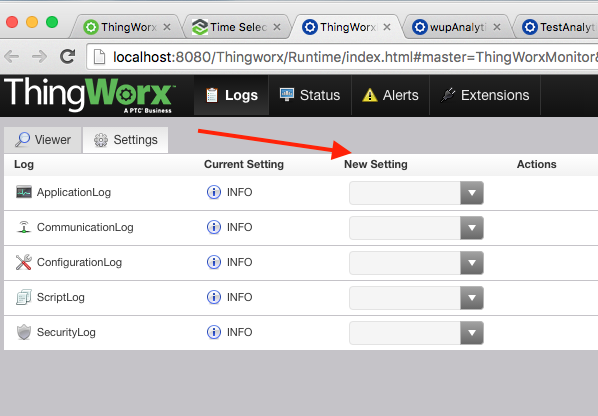
Once you are on ThingWorxMonitor you should go to Settings tab and change preferences to Info/Debug to decide the log level you want.

Best Regards,

Carles.

chrish1-VisitorAuthor
1-Visitor
June 28, 2016

Maybe I wasn't clear; I'm not asking how to view in Monitor. I know how that is supposed to work.

My question/problem is on the scripting side. When I use "logger.info(...)" or "logger.debug(...)" in a services scripting; then execute the service, it's not writing into server log. Therefore, it's not showing up in the Monitor regardless of filtering.

So my question, "Why?".


I don't have the problem with "logger.warn(...)" and "logger.error(...)"; these work and the output shows up in the Monitor log as expected.

1-Visitor
June 29, 2016

Hi Christopher,

Maybe either I was clear Please, read my post, and do what it says there:

Captura de pantalla 2016-06-29 08.05.56.png