

1-Visitor
October 2, 2017
Solved

Modbus Slave Simulator with ThingWorx Industrial Connectivity

  • October 2, 2017
  • 2 replies
  • 8551 views

Hi,

I am new to working with Modbus protocol. To understand how things work with Modbus and how would we collect the Data from Modbus using Industrial Connectivity, I am using Modbus Slave simulator which sends dummy data to some Register Addresses.

I have used My IP address for Host and 502 as a Port number. The simulator is kept refreshing the data every 1 sec.

To collect the data in Industrial Connectivity I have created new Channel with Driver: Modbus TCP/IP Ethernet and Port Number 502. Then I have created Device within Modbus Channel with the following Configuration:
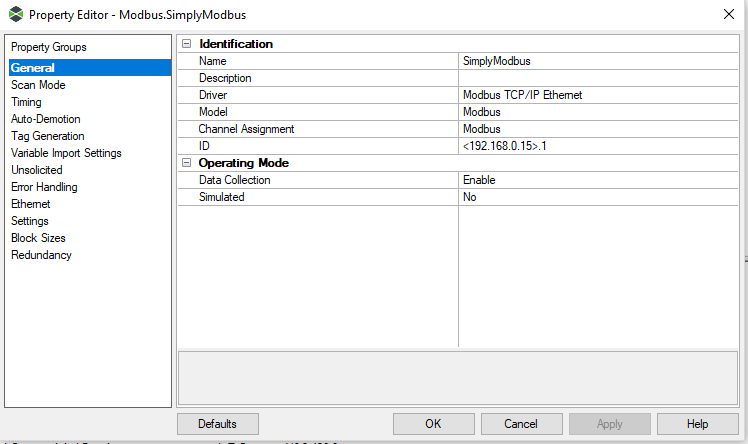
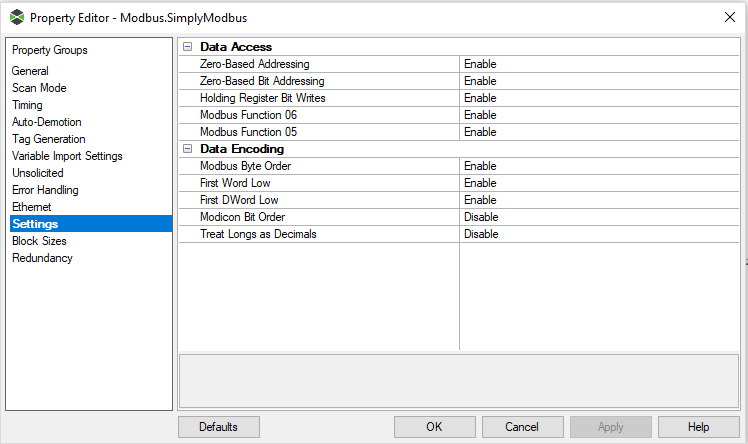
ModbusDevice.PNG ModbusDevice2.PNG

After that, I have created new Tag with 40001 Address and Datatype Default. But I am not receiving any data. To verify my connection, I did Launch Quick OPC Client but I am not receiving any data:
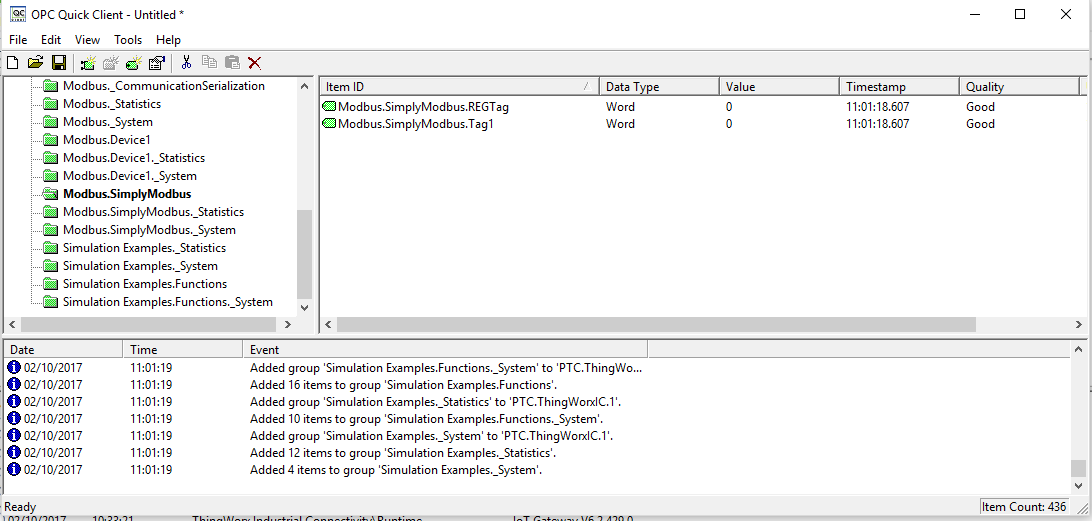
OPC Quick Client.PNG


Can you please help me out, I have only four days trial version of Modbus Simulator. I can't work with Edge MS as suggested here: Modbus PLC Simulator, ThingWorx and You aAs I am not able to download the Modbus Package.


Thanks in advance.

Best regards,

Neetu

Best answer by stmarchessault

Hi Neetu,

It looks like you have only one network adapter (NIC) available on this PC. The Device ID of 127.0.0.1 (loopback adapter address), and the Device ID of 192.168.0.15 (the IP address of the NIC itself) will both signal the Modbus TCP driver to enter into Modbus Slave mode. You want the Industrial Connectivity Modbus Master to communicate with the Modbus Slave Simulator software. When both applications are fulfilling the role of Modbus Slave, you will not be able to read values from the Modbus Slave Simulator, you will be reading the values for the Industrial Connectivity Modbus Slave (which default at zero at startup).

To solve this, you will need to do one of the following:

1. Install the Modbus Slave Simulator software on a different PC. You will want the two PCs to ideally be on the same network, or at the very least they need to be able to form a TCP socket connection from one to the other.

2. Install a new NIC on the PC, and use one NIC for your Modbus Slave Simulator software, and the other NIC for the Industrial Connectivity Modbus Master driver. The Device ID will then be the IP address of the NIC the Modbus Simulator Software is binding to.

3. Multi-home the NIC, giving it more than one IP address. Then, when you open the Channel Properties in Industrial Connectivity, you will see each IP available for selection from the Network Adapters list. You will assign a unique IP to each application, just as with Step 2.

The key will be that the Industrial Connectivity driver and the Modbus Slave Simulator are not both binding to the same NIC.

Best regards,

Steven M

2 replies

12-Amethyst
October 2, 2017

You may want to take a look at the Manufacturing Apps portal. It has some examples.

https://www.ptc.com/en/thingworx/manufacturing-apps/Dashboard/Get-Started

You need to register first. You can also post questions related to these manufacturing apps.

Manufacturing Apps

1-Visitor
October 2, 2017

Hi Varathan,

Thanks for your response. I will try to look into the portal.

Neetu

5-Regular Member
October 2, 2017

Greetings Neetu,

Looking at your screenshots, it appears the tags you have created are reading as "Good" Quality in the Quick Client. This implies the Industrial Connectivity OPC DA Server has attempted to communicate with the Device at those tag addresses, and it has received a valid response for this driver. Since the driver is configured as a Modbus TCP master, this also implies it has received a valid Modbus response from the device. It is likely the address being requested from the Modbus Simulator has a Value of "0" for the address requested.

Perhaps the Modbus simulator is using address 40001, with zero-based addressing disabled. With your current settings, try creating a new tag in the Industrial Connectivity server with an address of 40002. Do you find the value you are expecting now appears in the Quick Client?

Best regards,

Steven M

1-Visitor
October 2, 2017

Hi Steven,

Thanks for your response.

I have tried your solution but it didn't work. I am not receiving any values. Strangely I am receiving some values in item SuccefulReads of Channel Statistics which is keep updating. It is not making sense to me.

ModbusDevice_Stats.PNG

I am new to this Modbus protocol so probably I am not understanding the configuration in right way. I am using Modbus Simulator as a Slave and Modbus TCP driver in industrial connectivity as a Master which will read data from Simulator. Is this correct ?

Regards,

Neetu

5-Regular Member
October 2, 2017

Hi Neetu,

Yes, your description is correct.

That incrementing value for _SuccessfulReads reflects each successful attempt on the part of the Driver (the Modbus Master) to read a value from the Device (the Modbus Slave simulator), and this will increment at the rate of the requests being sent by the OPC Quick Client. This means the Modbus Slave simulator currently holds a value of "0" for the address being requested; and there have been 351 successful read request / read response transactions since you opened the QuickClient.

What values do you expect to see for these addresses?

Best regards,

Steven M