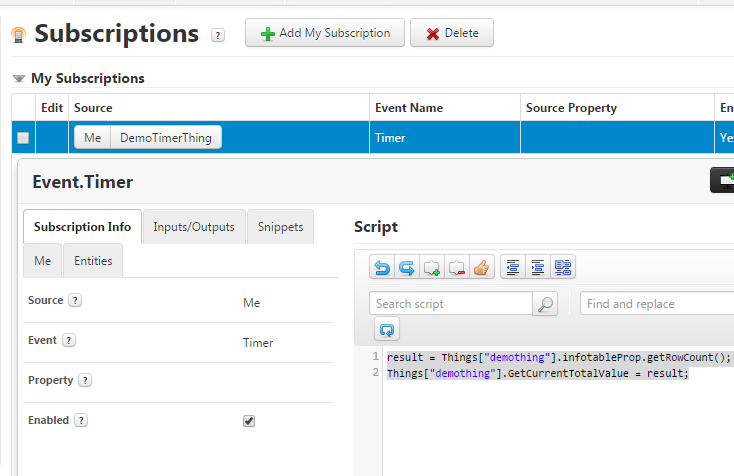
Aakash, what is updating the infotable? Can you not create an Event/Alert on that? In a crude and straight forward way you can simply create a Timer thing which subscribes to the Timer which fires every few seconds (you can configure as you feel). And in that Timer you can create a subscription which listens to itself. Under this subscription you can add your code to count the rows of the infotable and this way you have current state of the rows in the Infotable. For e.g. i added this code snippet in the Subscription like this and writes to a property GetCurrentTotalValue in DemoThing
result = Things["demothing"].infotableProp.getRowCount();
Things["demothing"].GetCurrentTotalValue = result;
This is how my subscription looks like:
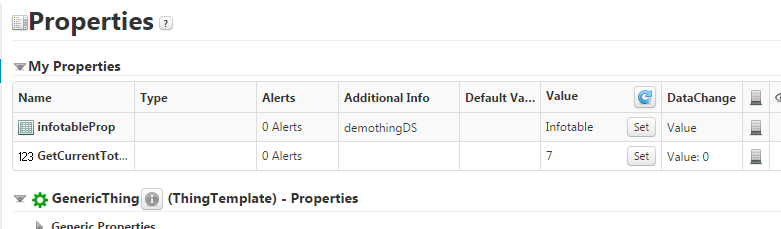
This timer fires every second and gets me the current row which I then store in a property in a Thing which contains a property persisting the infotable looks something like this. The GetCurrentTotalValue property below gets updated everytime the Timer thing is fired (which is every second) and updates the value
Hope this helps.


