

6-Contributor
August 30, 2016
Solved

RPi SteamSensor C SDK example - Error initializing SSL connection

  • August 30, 2016
  • 2 replies
  • 2298 views

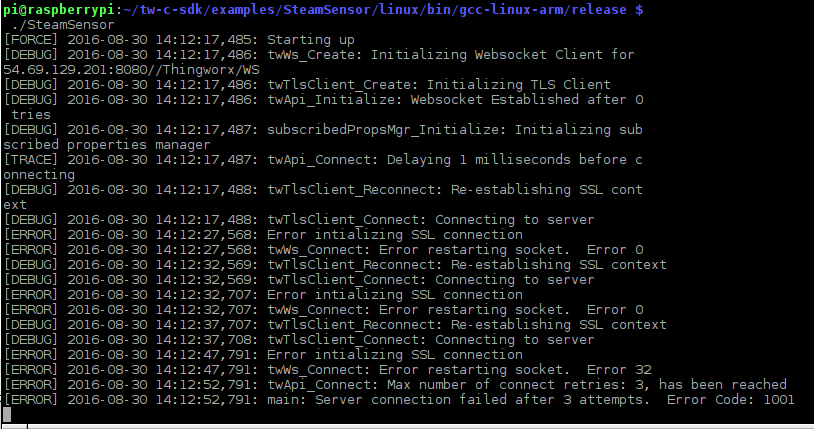
I'm exploring the C SDK on an RPi3 and the SteamSensor example fails to connect to ThingWorx.  I've followed the example from another post attempted various app keys from both users and admins in the accounts.  I've also tried connecting to the Vuforia pilot server with this approach, but i keep running inot the same error - "Error initializing SSL connection"  See screen cap below...  Any suggestions?  I've tried modifying main.c for both http and https and they both produce the same problem (our thingworx instance is not using HTTPS.
Best answer by mhollenbach

Rob,

Have you tried using the twApi_DisableEncryption() function when trying to run under an HTTP context? Just exercise that before you initialize the api. For example, in the SteamSensor example provided with the C SDK, this would be called in the main executable loop somewhere near the top of that function.

Regards,

Meghan

2 replies

5-Regular Member
August 31, 2016

Rob,

Have you tried using the twApi_DisableEncryption() function when trying to run under an HTTP context? Just exercise that before you initialize the api. For example, in the SteamSensor example provided with the C SDK, this would be called in the main executable loop somewhere near the top of that function.

Regards,

Meghan

rmiller-96-ContributorAuthor
6-Contributor
August 31, 2016

Well, it's sort-of the right answer...

I modified Main.c accordingly, but it didn't resolve the problem.  So, I commented out the twApi_DisableEncryption() function.  After recompiling, the RPi successfully connected and presented an unbound thing within ThingWorx.  The RPi could not find a 'thing' called SteamSensor1 and threw errors. Not sure what was amiss with main.c, but it seems to be getting past the connection issue.  I created a 'thing' SteamSensor1 and data started to flow.  I also put together a quick mashup to see data updating accordingly.

Next up is to work through the PIDataCollector example and go off-road from there.

Rob