

1-Visitor
September 18, 2017
Solved

Selected Rows Values are not available from Infotable property

  • September 18, 2017
  • 17 replies
  • 8842 views

Hi,

I have MyCustomThing having (employees) infotable as property, and script-service  to fetch data and set that infotable property.

On Mashup, when i call GetPropetryValue() and map this Infotable(employees) to the grid, then data loading into grid.

But selected Row values are not having data of selected row to load Gauge widget or label.

Is there anything i am missing.

It will work, if i set service return type as infotable and map to Grid.
Best answer by jdass

Hi Raj,

I have attached the modified entities. This is what I did

1) I created another infotable property InfoTableProp2 in TestThing

2) Created a service called getInfoTableValues and I used the infotable function UNION of get the rows of both the infotable properties.

3) Used the getInfoTableValues service in the mashup to display all the rows in one grid , and bound the selected rows of the service to the second grid.

17 replies

5-Regular Member
September 18, 2017

Hi Raj, what's triggering the selectedRow event? which field are you trying to bind from SelectedRow to the Gague?

1-Visitor
September 18, 2017

Hi Sushant.

Thanks for addressing this issue.

what's triggering the selectedRow event? - > This event is not bind trigger to anything on mashup.


which field are you trying to bind from SelectedRow to the Gague?

On grid row select, There are two fields from selected rows that i am trying to bind for "Data" and "MaxValue" of Gauge widget.

13-Aquamarine
September 18, 2017

Hi Raj,

Please elaborate a little more on your use case.

1-Visitor
September 19, 2017

Hi

Task is to set infotable property of thing via service, now retrieve this property and map to mashup grid.

on selecting any row of that grid, selected Rows columns should have values from that row ...but there values are not updating from selected row.

20-Turquoise
September 19, 2017

Are you trying to map the infotable values to the gauge? That would not work.

Instead, try the following: drop two grids onto a mashup. Bind All data from your service onto one of the grids. Then bind Selected Rows of your service onto the second grid. Load your mashup and try making a selection from grid 1.

1-Visitor
September 20, 2017

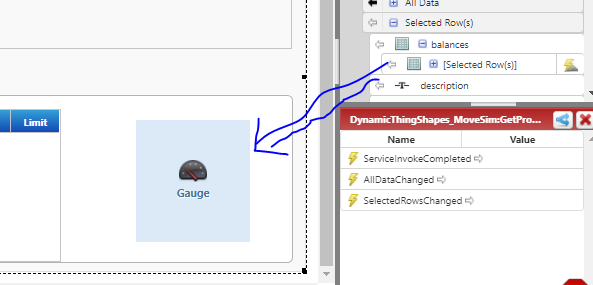
I have same use case, In same example can you map second grid from selected rows of Infotable as below (If you expand InfoProp you will get selected row)

because i have 5 infotable in property, how i can map all selected rows to just one Grid.

13-Aquamarine
September 20, 2017

The output mashup:

1-Visitor
September 21, 2017

Hi,

yeah getting infotable properties via services is one of the solution, i will definitely going to use this.

Really appreciate for your support.

one more thing, i am getting following error in log once on loading mashup. is it working fin to you?

I am using Thingworx 8

11:24:06 ERROR - An error occurred while calling dhxgrid::afterRender, Id = "dhxgrid-1". Exception: list.split is not a function

11:24:06 ERROR - An error occurred while calling dhxgrid::afterRender, Id = "dhxgrid-2". Exception: list.split is not a function

13-Aquamarine
September 21, 2017

Hi Raj,

Yes it works fine for me. The attachment has only the entities that I modified. 1) The TestThing and the 2) test mashup. Import the Thing first and then the mashup and keep the other entities you created in the Project. Ensure you have backup of your project before you replace your entities with mine. Let me know if you face any issue.

1-Visitor
September 21, 2017

anyway I have created at my local Thanks!!

just an another error i am getting on mashup log.  while loading any grid. Please let me know if you have any solution

11:24:06 ERROR - An error occurred while calling dhxgrid::afterRender, Id = "dhxgrid-1". Exception: list.split is not a function

13-Aquamarine
September 21, 2017

Raj ,

Are you using ThingWorx 8.0.2 ?

13-Aquamarine
September 21, 2017

This looks like a bug in the Thingworx 8.0.2 version. It has been reported to R&D. Article Viewer | PTC

Did you try it in different browsers?

1-Visitor
September 21, 2017

Yes i have tried with different browser but getting same error.

when I debugged then i found file Combined.8.0.0-b11.20170607.102535.00903.js    line no- 8407 splitting array of grid info with list.split(","); function where its an array of object.

  1. 0:{name: "No", label: "No", width: "100", align: "left", sortable: false, …}
  2. 1:{name: "Value", label: "Value", width: "100", align: "left", sortable: false, …}