

10-Marble
March 16, 2017
Solved

Service to convert Text output into InfoTable

  • March 16, 2017
  • 11 replies
  • 6449 views

Hi guys,

I have created a service using GetText() method and able to see in Text format. Which service need to get the same output in InfoTable ?

Here is the json script and output.

var restParams = {

  proxyScheme: undefined /* STRING */,

  headers: undefined /* JSON */,

  ignoreSSLErrors: undefined /* BOOLEAN */,

  useNTLM: undefined /* BOOLEAN */,

  workstation: undefined /* STRING */,

  useProxy: undefined /* BOOLEAN */,

  withCookies: undefined /* BOOLEAN */,

  proxyHost: undefined /* STRING */,

  url: "https://api.netbiter.net/operation/v1/rest/json/system/XXXXX/live/config?accesskey=XXXXXXX" /* STRING */,

  content: undefined /* JSON */,

  timeout: undefined /* NUMBER */,

  proxyPort: undefined /* INTEGER */,

  password: undefined /* STRING */,

  domain: undefined /* STRING */,

  username: undefined /* STRING */

};

// result: TEXT

var result= Resources["ContentLoaderFunctions"].GetText(restParams);
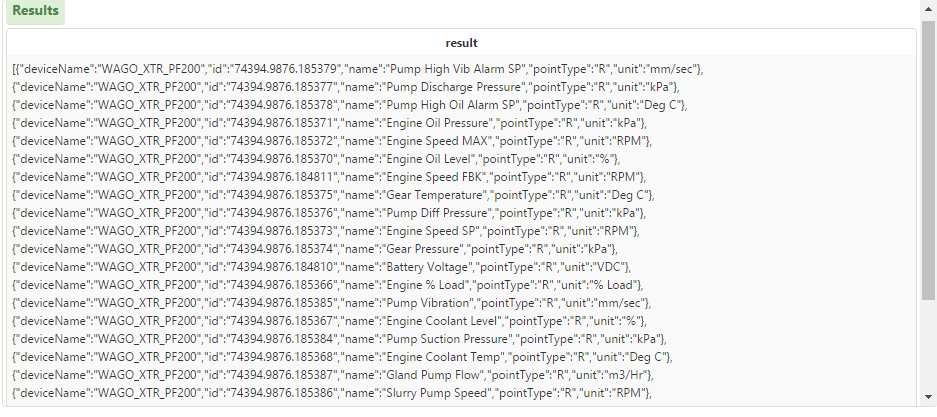
Thanks,

Hemanth kumar

Best answer by posipova

Hi, please use the following article to output to infotable:

https://support.ptc.com/appserver/cs/view/solution.jsp?n=CS179012&lang=en_US

11 replies

posipova20-TurquoiseAnswer
20-Turquoise
March 16, 2017

Hi, please use the following article to output to infotable:

https://support.ptc.com/appserver/cs/view/solution.jsp?n=CS179012&lang=en_US

20-Turquoise
March 16, 2017

Example, from json to infotable (don't forget to set your output result to infotable):

var params = {

proxyScheme: undefined /* STRING */,

headers: undefined /* JSON */,

ignoreSSLErrors: true /* BOOLEAN */,

useNTLM: undefined /* BOOLEAN */,

workstation: undefined /* STRING */,

useProxy: undefined /* BOOLEAN */,

withCookies: undefined /* BOOLEAN */,

proxyHost: undefined /* STRING */,

url:"insert-your-url-here",

timeout: undefined /* NUMBER */,

proxyPort: undefined /* INTEGER */,

password: undefined /* STRING */,

domain: undefined /* STRING */,

username: undefined /* STRING */

};

// result: JSON

var data = Resources["ContentLoaderFunctions"].GetJSON(params);

var params = {

infoTableName: undefined /* STRING */,

dataShapeName: "tktdatashape" /* DATASHAPENAME */

};

// result: INFOTABLE

var jsonTable = Resources["InfoTableFunctions"].CreateInfoTableFromDataShape(params);

for(var i=0;i<data.length;i++)

{

jsonTable.AddRow({TicketId:data.array.TicketId, CreationDate:data.array..CreationDate, AssignedTo:data.array.AssignedTo, Description:data.array.Description});

}

//}

result = jsonTable;

10-Marble
March 16, 2017

Hi Polina,

I have tried this before but it shows me as a blank in the table. Let me try once.

Thanks,

Hemanth kumar

10-Marble
March 16, 2017

Hi Polina,

Thanks for your reply. Here is the code I have tried and output as shows below.

var restParams = {

  proxyScheme: undefined /* STRING */,

  headers: undefined /* JSON */,

  ignoreSSLErrors: undefined /* BOOLEAN */,

  useNTLM: undefined /* BOOLEAN */,

  workstation: undefined /* STRING */,

  useProxy: undefined /* BOOLEAN */,

  withCookies: undefined /* BOOLEAN */,

  proxyHost: undefined /* STRING */,

  url: "https://api.netbiter.net/operation/v1/rest/json/system/XXXXX/live/config?accesskey=XXXXXX" /* STRING */,

  content: undefined /* JSON */,

  timeout: undefined /* NUMBER */,

  proxyPort: undefined /* INTEGER */,

  password: undefined /* STRING */,

  domain: undefined /* STRING */,

  username: undefined /* STRING */

};

// result: JSON

var data = Resources["ContentLoaderFunctions"].GetJSON(restParams);

var params = {

infoTableName: "InfoTable" /* STRING */,

dataShapeName: "BoosterLiveDataShape" /* DATASHAPENAME */

};

// result: INFOTABLE

var jsonTable = Resources["InfoTableFunctions"].CreateInfoTableFromDataShape(params);

for(var i=0;i<data.length;i++)

{

jsonTable.AddRow({DeviceName:data.array.deviceName, ID:data.id, Name:data.name, Unit:data.unit});

}

//}

result = jsonTable;

Thanks,

Hemanth kumar

20-Turquoise
March 17, 2017

As another follow-up, this is a useful tool for verifying your json and getting a quick reference for what your datashape fields should look like:

JSONLint - The JSON Validator.