

April 12, 2017
Solved

Thingworx 7.4 Composer does not start the Tomcat service go down

  • April 12, 2017
  • 9 replies
  • 14091 views

Hi All,

I installed Thingworx 7.4 on VM Windows 7 64 bit using Postgres 9.4.

During the installation I did not receive warning or error (I used the Installing_ThingWorx_7.4_1.pdf downloaded from PTC).

When I use the url localhost:8080 (for access to apache-tomcat) or localhost:808/Thingworx/Composer/index.html  (for access to Composer) the

Apache-Tomcat service on machine go down.

Are there some suggestion?

Many Thank

Dimitri
Best answer by posipova

Are you on Windows?

If so, try the following:

1. Remove the path from your tomcat Java  tab, just keep these settings:

-Dserver -Dd64

-XX:+UseNUMA

-XX:+UseConcMarkSweepGC

-Dfile.encoding=UTF-8

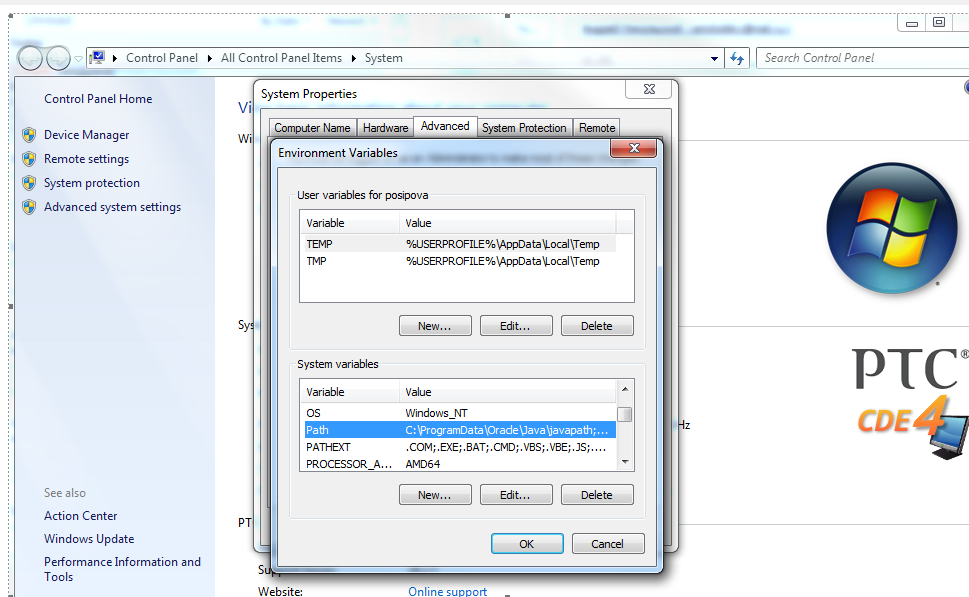
2. Go to explorer, right click on "my computer" -> Properties -> Advanced settings -> Environment variables -> edit "PATH", add ; and then path to your tomcat extensions folder, “ ;<path to extensions folder of tomcat> “ or, for example ";C:\ptc\Thingworx\webapps\Thingworx\WEB-INF\extensions"

9 replies

1-Visitor
April 12, 2017

I have the same problem, if I put the Thingworx.war file on my Tomcat folder, tomcat will not start and if I use the Tomcat manager app in localhost and try to upload the Thingworx.war, it will stop at 2% and then say there has been an error.

Any help would be appreciated thank you!

Eric

5-Regular Member
April 12, 2017

Hi Eric Fernandez​,

I would suggest you to open a Separate Thread as your case could be different.

If you are facing error in deploying the war file; you can place the war file directly in <Tomcat-Home>/webapps folder.

1-Visitor
April 12, 2017

Hi Ankit Gupta​,

I understand there may be a difference as I am upgrading and he is installing it but the problem itself is the same, Tomcat server does not run when updating to 7.4. As I mentioned before, if I place the war file directly into the /webapps folder Tomcat will not start, and if I use the manager app to load the war file, Tomcat will stop and say connection lost.

I checked my Thingworx Applications log (this is the one inside Thingworx Composer right?) and there were no errors related to this upgrade.

Just went through all the updates steps again, put the license, added the djava, updated the database through the bat... Still same problem.

Thank you for your help.

Eric

14-Alexandrite
April 12, 2017

Hi Dimitri Bologna,

Could you check if any error logs in your Tomcat?

1. I suppose this issue is caused by misconfiguration between ThingWorx and PostgreSQL connection.

2. Also to use the default ThingworxPlatform configuration directory, create a folder called ThingworxPlatform at the root of the drive where Tomcat was installed. Alternatively, if you want to specify the location where ThingWorx stores its settings, you can set the THINGWORX_PLATFORM_SETTINGS environment variable to the desired location.

Ensure that the folder referenced by THINGWORX_PLATFORM_SETTINGS exists and is writable by the Tomcat user. This environment variable should be configured as part of the system environment variables.

3. Place the platform-settings.json file into the ThingworxPlatform folder, and make sure you input a correct username and password you creatd in PostgreSQL.

Hope this helps,

Br,

Anna

1-Visitor
April 12, 2017

Hi Anna,

Checked all you mentioned and everything was set alright. Still nothing, and there are no errors coming from Tomcat, it just does not start or while loading the war file it disconnects.

I can only think of doing a from scratch installation but that should not be needed. Thank you for your help.

Eric

5-Regular Member
April 12, 2017

Did you get a chance to check the ThingWorx Application logs too?

5-Regular Member
April 12, 2017

Hi Dimitri Bologna​,

There are some changes in the ThingWorx 7.4 installation.

A new setting is required in 7.4: Djava.library.path=<path to Tomcat>\webapps\Thingworx\WEB-INF\extensions

And have you added the license file?

Other than this; did you add credentials for Database connection in platform-settings.json

If you still face the issue please check the Tomcat logs and ThingWorx Application logs and share the logs snippet to find the Root cause.

April 12, 2017

Hi Ankit,

I added all the setting for java

I added the licence file  and the platform-settings.json into THINGWORX_PLATFORM_SETTINGS .

BR

Dimitri

5-Regular Member
April 12, 2017

Dimitri, could you please attach/share you catalina.out from Tomcat. Which version of Tomcat are you using? Additionally, do note that Win7 is not an officially supported environment, even though it may work.

April 12, 2017

Hi Sushant,

in the following the last row of catalina.log

12:39:36.118 INFO [main] org.apache.catalina.core.StandardService.startInternal Starting service Catalina

12-Apr-2017 12:39:36.118 INFO [main] org.apache.catalina.core.StandardEngine.startInternal Starting Servlet Engine: Apache Tomcat/8.0.36

12-Apr-2017 12:39:36.274 INFO [localhost-startStop-1] org.apache.catalina.startup.HostConfig.deployWAR Deploying web application archive C:\Tomcat 8.0.36\webapps\Thingworx.war

12-Apr-2017 12:39:54.977 INFO [localhost-startStop-1] org.apache.jasper.servlet.TldScanner.scanJars At least one JAR was scanned for TLDs yet contained no TLDs. Enable debug logging for this logger for a complete list of JARs that were scanned but no TLDs were found in them. Skipping unneeded JARs during scanning can improve startup time and JSP compilation time.

12-Apr-2017 12:40:24.155 INFO [main] org.apache.catalina.startup.VersionLoggerListener.log Server version:        Apache Tomcat/8.0.36

12-Apr-2017 12:40:24.155 INFO [main] org.apache.catalina.startup.VersionLoggerListener.log Server built:          Jun 9 2016 13:55:50 UTC

12-Apr-2017 12:40:24.155 INFO [main] org.apache.catalina.startup.VersionLoggerListener.log Server number:         8.0.36.0

12-Apr-2017 12:40:24.155 INFO [main] org.apache.catalina.startup.VersionLoggerListener.log OS Name:               Windows 7

12-Apr-2017 12:40:24.155 INFO [main] org.apache.catalina.startup.VersionLoggerListener.log OS Version:            6.1

12-Apr-2017 12:40:24.155 INFO [main] org.apache.catalina.startup.VersionLoggerListener.log Architecture:          amd64

12-Apr-2017 12:40:24.155 INFO [main] org.apache.catalina.startup.VersionLoggerListener.log Java Home:             C:\Java_1.8.0_101\jre

12-Apr-2017 12:40:24.155 INFO [main] org.apache.catalina.startup.VersionLoggerListener.log JVM Version:           1.8.0_101-b13

12-Apr-2017 12:40:24.155 INFO [main] org.apache.catalina.startup.VersionLoggerListener.log JVM Vendor:            Oracle Corporation

12-Apr-2017 12:40:24.155 INFO [main] org.apache.catalina.startup.VersionLoggerListener.log CATALINA_BASE:         C:\Tomcat 8.0.36

12-Apr-2017 12:40:24.155 INFO [main] org.apache.catalina.startup.VersionLoggerListener.log CATALINA_HOME:         C:\Tomcat 8.0.36

12-Apr-2017 12:40:24.155 INFO [main] org.apache.catalina.startup.VersionLoggerListener.log Command line argument: -Dcatalina.home=C:\Tomcat 8.0.36

12-Apr-2017 12:40:24.155 INFO [main] org.apache.catalina.startup.VersionLoggerListener.log Command line argument: -Dcatalina.base=C:\Tomcat 8.0.36

12-Apr-2017 12:40:24.155 INFO [main] org.apache.catalina.startup.VersionLoggerListener.log Command line argument: -Djava.endorsed.dirs=C:\Tomcat 8.0.36\endorsed

12-Apr-2017 12:40:24.171 INFO [main] org.apache.catalina.startup.VersionLoggerListener.log Command line argument: -Djava.io.tmpdir=C:\Tomcat 8.0.36\temp

12-Apr-2017 12:40:24.171 INFO [main] org.apache.catalina.startup.VersionLoggerListener.log Command line argument: -Djava.util.logging.manager=org.apache.juli.ClassLoaderLogManager

12-Apr-2017 12:40:24.171 INFO [main] org.apache.catalina.startup.VersionLoggerListener.log Command line argument: -Djava.util.logging.config.file=C:\Tomcat 8.0.36\conf\logging.properties

12-Apr-2017 12:40:24.171 INFO [main] org.apache.catalina.startup.VersionLoggerListener.log Command line argument: -Dserver -Dd64

12-Apr-2017 12:40:24.171 INFO [main] org.apache.catalina.startup.VersionLoggerListener.log Command line argument: -XX:+UseG1GC

12-Apr-2017 12:40:24.171 INFO [main] org.apache.catalina.startup.VersionLoggerListener.log Command line argument: -Dfile.encoding=UTF-8

12-Apr-2017 12:40:24.171 INFO [main] org.apache.catalina.startup.VersionLoggerListener.log Command line argument: -Djava.library.path=C:\Tomcat 8.0.36\webapps\Thingworx\WEB-INF\extensions

12-Apr-2017 12:40:24.171 INFO [main] org.apache.catalina.startup.VersionLoggerListener.log Command line argument: exit

12-Apr-2017 12:40:24.171 INFO [main] org.apache.catalina.core.AprLifecycleListener.lifecycleEvent The APR based Apache Tomcat Native library which allows optimal performance in production environments was not found on the java.library.path: C:\Tomcat 8.0.36\webapps\Thingworx\WEB-INF\extensions

12-Apr-2017 12:40:24.702 INFO [main] org.apache.coyote.AbstractProtocol.init Initializing ProtocolHandler ["http-nio-80"]

12-Apr-2017 12:40:24.874 INFO [main] org.apache.tomcat.util.net.NioSelectorPool.getSharedSelector Using a shared selector for servlet write/read

12-Apr-2017 12:40:24.889 INFO [main] org.apache.coyote.AbstractProtocol.init Initializing ProtocolHandler ["ajp-nio-8009"]

12-Apr-2017 12:40:24.889 INFO [main] org.apache.tomcat.util.net.NioSelectorPool.getSharedSelector Using a shared selector for servlet write/read

12-Apr-2017 12:40:24.889 INFO [main] org.apache.catalina.startup.Catalina.load Initialization processed in 2034 ms

12-Apr-2017 12:40:24.936 INFO [main] org.apache.catalina.core.StandardService.startInternal Starting service Catalina

12-Apr-2017 12:40:24.936 INFO [main] org.apache.catalina.core.StandardEngine.startInternal Starting Servlet Engine: Apache Tomcat/8.0.36

12-Apr-2017 12:40:24.983 INFO [localhost-startStop-1] org.apache.catalina.startup.HostConfig.deployWAR Deploying web application archive C:\Tomcat 8.0.36\webapps\Thingworx.war

12-Apr-2017 12:40:43.216 INFO [localhost-startStop-1] org.apache.jasper.servlet.TldScanner.scanJars At least one JAR was scanned for TLDs yet contained no TLDs. Enable debug logging for this logger for a complete list of JARs that were scanned but no TLDs were found in them. Skipping unneeded JARs during scanning can improve startup time and JSP compilation time.

BR

Dimitri

5-Regular Member
April 12, 2017

Hi Dimitri Bologna​,

Could you please share the ThingWorx application logs too?

5-Regular Member
April 12, 2017

Dimitri BolognaEric Fernandez

Could you please try below steps and share feedback:

1.Stop tomcat

2.Delete Thingworx folder and Thingworx.war file present inside Tomcat webapps. ( Backup if you have something important)

3.Configure Java Options in Tomcat as below:

-Dserver -Dd64

-XX:+UseNUMA

-XX:+UseConcMarkSweepGC

-XX:PermSize=2048m

-XX:MaxPermSize=2048m

-Djava.library.path=C:\Program Files\Apache Software Foundation\Tomcat 8.0\webapps\Thingworx\WEB-INF\extensions

Please refer KCS article for more details : https://support.ptc.com/appserver/cs/view/solution.jsp?n=CS195506&lang=en_US

4. Copy the Thingworx.war file and place it in the following location of your Tomcat installation:

\Apache Software Foundation\Tomcat 8.0\webapps

5. Obtain the license.bin file from the download package and place the license.bin file in your ThingworxPlatform folder.

NOTE: The location of the ThingworxPlatform folder varies, as it is determined per your initial set up. Failure to place the license.bin in the ThingworxPlatform folder will result in ThingWorx not starting after deployment.

6. Launch Tomcat and verify Thingworx login.

If you still have issues please share your tomcat, java and OS versions along with Tomcat logs & ThingWorx Application logs.

-Durgesh

1-Visitor
April 12, 2017

Hi Durgesh Patel​,

I have attached the logs in a previous message. Tomcat 8.0, Java JDK 1.8.0_121, Windows 10, PostgressSQL 9.4.11. Following your steps I was able to run Tomcat and it not shutting down, however it was like in a constant loading loop and nor the localhost nor Thingworx loaded.

Thank you very much,

Eric

1-Visitor
April 12, 2017

This worked for me too, thank you Polina! This should be added to the installation document! Thank you very much all.

BR

Eric

20-Turquoise
April 12, 2017

I made a post about it in the community 7.4 Thingworx does not launch due to license error in Windows

I published an article a while back, but i do realize the KCS is not linked to the community for an easy search: https://support.ptc.com/appserver/cs/view/solution.jsp?n=CS259974&lang=en_US

20-Turquoise
April 12, 2017

Also I reported a Jira for the issue to either fix or validate the steps.Jira # PSPT-3576

12-Amethyst
April 14, 2017

I had the same issue, adding the above Tomcat Configuration (slightly different configuration from previous release), adding extension folder to path along with ensuring copying the license file to Thingworx Storage fixed.

1-Visitor
April 26, 2017

Ran into the very same issues and logs as Dimitri posted here, though I was using the default H2 database in the 120-day developer trial. Applied Polina's workaround and worked well. Thanks all!

20-Turquoise
April 26, 2017

Could you please share the path in the tomcat Java configuration that wasn't working for you until applying my workaround? I'm trying to figure out a way to reproduce this issue to demonstrate to r&D, and so far don't have a consistent scenario.

Thank you!

1-Visitor
April 30, 2017

Before the workaround, I added the following lines in the Tomcat Java options:

-Dserver -Dd64

-XX:+UseG1GC

-Dfile.encoding=UTF-8

-Djava.library.path=C:\Program Files\Apache Software Foundation\Tomcat 8.0\webapps\Thingworx\WEB-INF\extensions

My "ThingworxPlatorm" folder containing the license the bin is at:

C:\ThingworxPlatform

I was following v1.1 of the "Installing ThingWorx 7.4" document.

After I removed the path in Java options and placed it in System Path, it worked.

1-Visitor
May 3, 2017

The solution works for Windows 10 at my laptop. I used "-Djava.library.path" rather than environment path.

But when I tried to load Thingworx 7.4 on our Red Had Linux server, then it failed to start Tomcat. I used the following option in catalina.sh


JAVA_OPTS="-Dserver -Xms128m -Xmx4g -Dd64 -Dfile.encoding=UTF-8 -Djava.library.path=/www/tomcat/webapps/Thingworx/WEB-INF/extensions"

Have you any idea why Tomcat doesn't start on Red Hat Linux?