
5-Regular Member
February 27, 2017
Solved

Thingworx Analytics Installation Error

  • February 27, 2017
  • 1 reply
  • 2958 views

Hello,

I am installing TWX Analytics for the first time and facing this error when I use the build-vmware.bat command.

I am using VMware version 12.
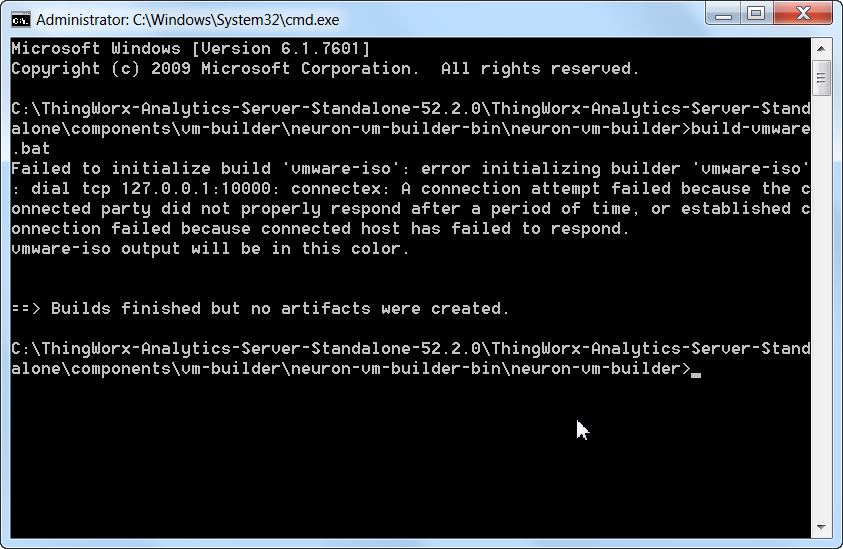
Kindly help me resolve this.

Thanks,

Avinash

Best answer by cmorfin

Hi Avinash

This is the very beginning of the installation process and packer fails to connect.

It is probably related to some security settings son your side. If at all possible disable your firewall / antivirus, this is what solved: Hashicorp Packer won't execute packer-provisioner-shell on Windows host - Stack Overflow .

Also make sure you perform the modification mentioned at https://support.ptc.com/appserver/cs/view/solution.jsp?n=CS256240 - it won't fix this specific error that you have got now, but if you do not do it, you will have errors later on.

Kind regards

Christophe

1 reply

cmorfin19-TanzaniteAnswer
19-Tanzanite
February 27, 2017

Hi Avinash

This is the very beginning of the installation process and packer fails to connect.

It is probably related to some security settings son your side. If at all possible disable your firewall / antivirus, this is what solved: Hashicorp Packer won't execute packer-provisioner-shell on Windows host - Stack Overflow .

Also make sure you perform the modification mentioned at https://support.ptc.com/appserver/cs/view/solution.jsp?n=CS256240 - it won't fix this specific error that you have got now, but if you do not do it, you will have errors later on.

Kind regards

Christophe

agangaiah5-Regular MemberAuthor
5-Regular Member
February 27, 2017

Hi Morfin,

Thank you very much. I have installed the VM.

Now I am facing another hurdle here: When I log in to VM, I have been asked with the twx-ml login as shown below:

I do not have any login provided for this. Really appreciate your help here.

Thanks,

Avinash

19-Tanzanite
February 27, 2017

Hi Avinash

Good that you made it work.

Do you think you can share what you did ?

This would be quite helpful to others who may face the same error in the future.

Regarding the login, have a look at: https://support.ptc.com/appserver/cs/view/solution.jsp?n=CS236376

in addition to the login it also give you some useful link to get started with ThingWorx analytics.

Note that, all being well, the only reason you would need to log into the VM is to retrieve its ip address in order to access it from ThignWorx analytics Builder or REST API calls.

Thanks

Kind regards

Christophe