

1-Visitor
September 19, 2017
Solved

Tree widget connect to list widget

  • September 19, 2017
  • 6 replies
  • 3801 views

I have two data tables, one is connect to tree widget and the other one is connect to widget.


I want to add one function that when I click tree item, the list will be updated according to the tree item selection.


For example, table1 is city, table2 is city and company, so when I click tree widget "Chicago", the list will show all companies in Chicago.


Thank you!


Matt
Best answer by posipova

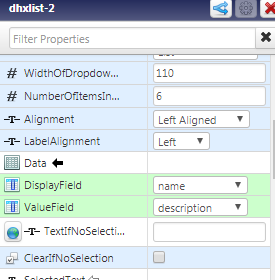
Please find my example attached. Note that in your case, selected rows should be bound to a custom service that takes an input (Chicago) and defines the output (companies), then bind it to the List. You also have to configure DisplayField and ValueField for the list to render properly.

6 replies

20-Turquoise
September 19, 2017

What is the current issue you are experiencing, is it related to implementation or runtime?

You'd be dropping all data onto your tree widget first (although I recommend looking into the advanced tree grid instead as the tree widget is not supported anymore, ThingWorx IoT Marketplace), then bind selected rows as an input parameter to the custom service that defines the output for the list widget. Then the output of that service to be bound to the lst widget.

mwu-211-VisitorAuthor
1-Visitor
September 19, 2017

First, thank for your reply, this question is related to implementation.

Actually I cannot bind the selected row to the list widget. I know how to bind the data from tree widget to google map and gauge, but I have tried many times for binding list widget, and it didn't work. Do you have any idea?

Thank you again!

20-Turquoise
September 19, 2017

I will look into building a small example for you tomorrow during the US office hours.

Sorry I don't have access to the composer right now.

posipova20-TurquoiseAnswer
20-Turquoise
September 20, 2017

Please find my example attached. Note that in your case, selected rows should be bound to a custom service that takes an input (Chicago) and defines the output (companies), then bind it to the List. You also have to configure DisplayField and ValueField for the list to render properly.

mwu-211-VisitorAuthor
1-Visitor
September 20, 2017

Thank you very much, it is very helpful. Moreover, I also found the other way to solve it. I used FindDataTableEntries to get the city name. Anyway, I very appreciate your help! 

20-Turquoise
September 20, 2017

Glad it work! Let us know if you experience any other issues 🙂