
1-Visitor
March 29, 2017
Solved

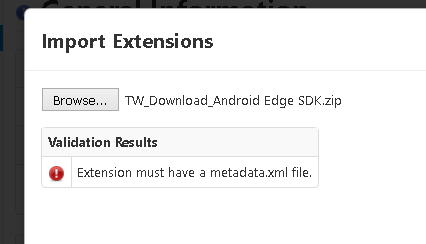
TW_Download_Android Edge SDK unable to import extension metadata.xml not present
  • March 29, 2017
  • 8 replies
  • 3456 views

android extension error.PNG

Downloaded from Thingworx marketplace.

Checked in to extracted file having folders but not metadata.xml file.

Best answer by supandey

Pravin, just to confirm are you using Android Edge SDK from the Marketplace? Do note this is not meant to be imported directly in the ThingWorx Composer. You will have to import one or the full project into an IDE like Android Studio and build your Android Application using the Android SDK, please use this guide for more detail.

Hope this helps.

8 replies

supandey5-Regular MemberAnswer
5-Regular Member
March 29, 2017

Pravin, just to confirm are you using Android Edge SDK from the Marketplace? Do note this is not meant to be imported directly in the ThingWorx Composer. You will have to import one or the full project into an IDE like Android Studio and build your Android Application using the Android SDK, please use this guide for more detail.

Hope this helps.

5-Regular Member
March 29, 2017

Hi pravin pradhan​,

To add what Sushant mentioned. Android SDK is not an extension.

It is meant to send data from an Android Device to ThingWorx Platform.

Thanks,

Ankit Gupta

1-Visitor
March 29, 2017

Thank you for your quick reply i will follow the guide.

5-Regular Member
March 29, 2017

Just to update on this thread, i have noticed the guide on the Marketplace is not accessible. So I've taken it up internally to get it fixed.

1-Visitor
March 29, 2017

Ok thanks how much time is expected ? or is there any other source for the same?

5-Regular Member
March 29, 2017

Pravin in my earlier response i already included the alternate path so you don't have to wait for the fix you can simply navigate to PTC

otherwise when you'd download the zip file it includes the doc folder with the guide. It's the same guide which should also be reachable directly from the Marketplace.