

4-Participant
August 1, 2017
Solved

While installing Eclipse Plugin for ThingWorx Extension getting error

  • August 1, 2017
  • 8 replies
  • 3526 views

Hi,

After downloading plugin from ThingWorx marketplace when I am trying to install it on eclipse. Getting below error:

"Missing requirement: ThingWorx Extension Builder 7.2.0.201608021836 (com.thingworx.eclipse.extension.feature.feature.group 7.2.0.201608021836) requires error while installing Eclipse Plugin for ThingWorx Extension"
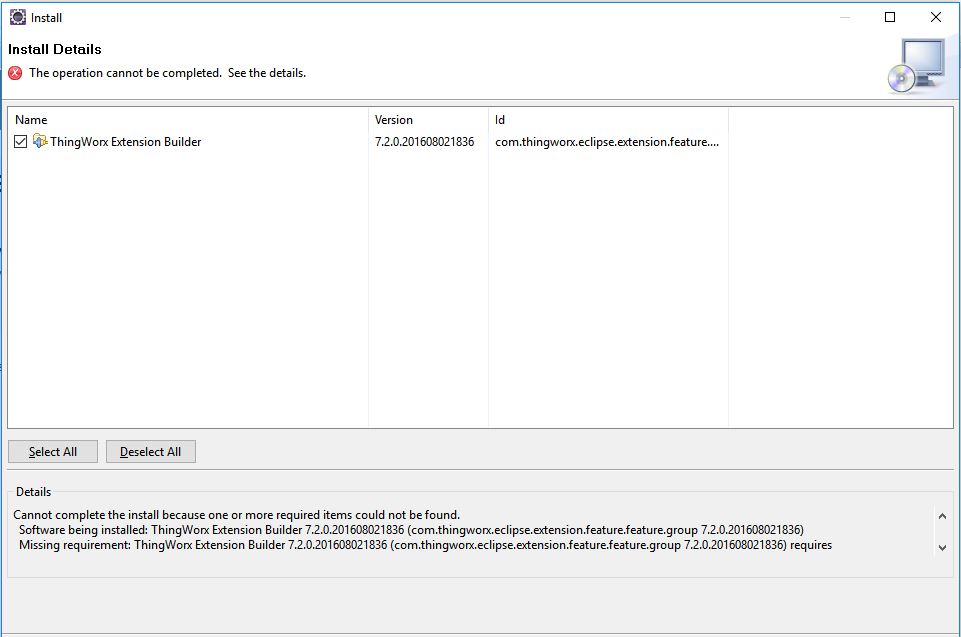
Eclipse Plugin for ThingWorx Error.JPG

Can anyone help on this ?

Regards,

Sunil

Best answer by posipova

Your version of Eclipse is too old, please note the requirements state a minimum Mars is needed to use the plugin. Please try upgrading the Eclipse and let us know if it doesn't resolve the issue. Thank you!

8 replies

20-Turquoise
August 1, 2017

What is your eclipse version? Do you have IDE /EE?

What are the components you downloaded and how are you trying to install it?

skumar-614-ParticipantAuthor
4-Participant
August 1, 2017

Hi Polina,

Yes I have Eclipse Java EE IDE.

Eclipse Version: Kepler Service Release 2

First I downloaded 'Eclipse Plugin for ThingWorx Extensions zip' file from ThingWorx marketplace.

After downloading this extension I am following below steps:

1. Selecting 'Install New Software' option under Help menu, Install screen appear.

2. Clicking on Add and added downloaded 'Eclipse Plugin for ThingWorx Extensions zip' file.

3. Selecting ThingWorx Extension Builder after deselecting the 'Group items by category' checkbox and Click NEXT...

4. After clicking Next it takes few minutes and throw the above mentioned error.

posipova20-TurquoiseAnswer
20-Turquoise
August 1, 2017

Your version of Eclipse is too old, please note the requirements state a minimum Mars is needed to use the plugin. Please try upgrading the Eclipse and let us know if it doesn't resolve the issue. Thank you!

1-Visitor
August 2, 2017

Working fine with Eclipse JEE NEON version with mention version TWE.

1-Visitor
August 2, 2017

Hi Sai Kumar,

I got the same issue, You can resolve it by Go to Available software Sites and select all available softwares then OK then proceed.

I solved the same problem like this.

regards,

madhuupload.PNG

skumar-614-ParticipantAuthor
4-Participant
August 2, 2017

I was using older version of Eclipse, issue has been resolved after upgrading Eclipse to 'Neon Release (4.6.0)' version. Thanks Madhu for your reply.