

1-Visitor
March 24, 2017
Solved

Widget list/dropdown that show multi columns

  • March 24, 2017
  • 1 reply
  • 2248 views

Hello,

In a mashup, I'd like a dropdown list that show multiple columns, like an infotable in a dropdown list. Do you have any idea how I can do that ?

- The list of rows can be opened and closed like a dropdown (~widget list)

- The row contains many columns like the widget grid (editable, checkbox...)

- When the dropdown list is opened, it can overlay all widgets / layouts / rows that are below the list

I tried to add a Grid in a Folding Panel for the effect of the dropdown list. But the size of the Folding Panel is fixed and it doesn't show a scroll when the Grid is longer than the Folding Panel.

Thank you for your attention.

Quang-Dung
Best answer by zyuan1

Hello, the List widget might not be able to show more than one columns, and if the folding panel could not meet your requirement, then we should give it up.

I'm not sure whether the expandable Footer/ Header/ Sidebars could meet your needs, but I'll see them as a good fit:

  • The Footer/ Header/ Sidebars are responsive, so they can hold a Grid widget directly (Many columns)
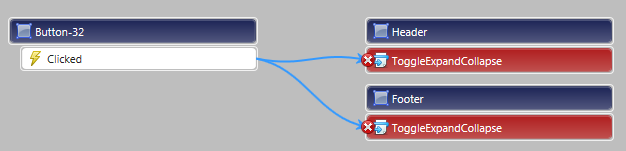
  • The Footer/ Header/ Sidebars can be bound with a button, and clicking the button to activate the ToggleExpandCollapse service, making it "The list of rows can be opened and closed like a dropdown"
  • It can overlay all widgets when opened

1 reply

zyuan15-Regular MemberAnswer
5-Regular Member
March 29, 2017

Hello, the List widget might not be able to show more than one columns, and if the folding panel could not meet your requirement, then we should give it up.

I'm not sure whether the expandable Footer/ Header/ Sidebars could meet your needs, but I'll see them as a good fit:

  • The Footer/ Header/ Sidebars are responsive, so they can hold a Grid widget directly (Many columns)
  • The Footer/ Header/ Sidebars can be bound with a button, and clicking the button to activate the ToggleExpandCollapse service, making it "The list of rows can be opened and closed like a dropdown"
  • It can overlay all widgets when opened

qngo1-VisitorAuthor
1-Visitor
March 29, 2017

Hello, thank you for your answer. I thought about using Footer/Header/Sidebars as you said. But in order to place the Grid next to other widgets in the mashup, a lot of layouts are needed.

5-Regular Member
March 29, 2017

Hi, in that case, you can choose a responsive area in the place you want, put down a Contained Mashup widget, and put the Mashup with expandable Footer/Header/Sidebar into it.  Now you could have a expandable Grid by the side of other widgets you want.

And you might try not to use too much layout in a Mashup, I assume it's better for the structure.