
10-Marble
August 26, 2025
Question

Creo Piping table template in drawing

  • August 26, 2025
  • 2 replies
  • 802 views

Hi All,


I'd like to create a pipe table template to show same info as the table below for any piping assembly.

It has to be valid for both bent and straight pipes.

How repeat region settings should be set to get this outcome please?

Also, is it possible to replace the index_rpt parameter (Item column) with a component parameter 'linenumber' to show the number based on an existing BOM?
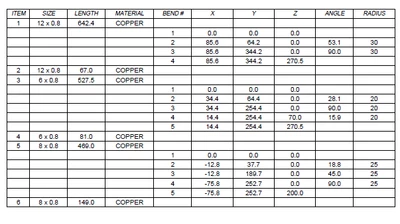
image.png

 Many thanks in advance for your help!

2 replies

21-Topaz I
August 27, 2025

Hi @Bearanto 


You need to create table template and I assume you need to create a .tbl file to output the table as shown in the picture you attached.
I have not looked to the report parameters into details but this topic might offer good ressources : https://community.ptc.com/t5/3D-Part-Assembly-Design/Bending-table-with-Part-Co-ordinate-system/m-p/276045


This reply is attached with a tbl file that you can derive from : https://community.ptc.com/t5/3D-Part-Assembly-Design/Bending-table-with-Part-Co-ordinate-system/m-p/276048/highlight/true#M109246 


Bearanto10-MarbleAuthor
10-Marble
August 27, 2025

Hi @remy ,


Thanks for your reply, I went already through the resources you mentioned and PTC support, but now I'm looking for a solid example on how to create that very specific table I attached with all the related repeat region settings to achieve that result, and if it is possible to replace the index_rpt number with component parameter 'linenumber' to carry over existing BOM references.


Many thanks!

21-Topaz I
September 2, 2025

Understood.
Amongst all the tbl examples, did you find any that's close enough to what you are looking for ?

Then maybe edit it to fit your need ?

Catalina
Community Moderator
September 9, 2025

Hi @Bearanto,


I wanted to see if you got the help you needed.


If so, please mark the appropriate reply as the Accepted Solution or please feel free to detail in a reply what has helped you and mark it as the Accepted Solution. It will help other members who may have the same question.


Of course, if you have more to share on your issue, please pursue the conversation.


Thanks,

Catalina | PTC Community Moderator