

13-Aquamarine
March 15, 2016
Solved

We get no file using, File, Save As, Shrinkwrap, using default settings

  • March 15, 2016
  • 4 replies
  • 2811 views

There is a checkmark box at the bottom of the save as dialog that is check marked by default when you pick shrinkwrap as the type.

"Save new files to model's CAD Document"
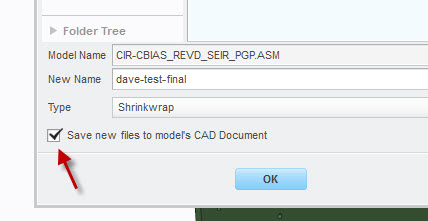
check-mark.jpg

When that is check marked we get no shrinkwrap part.

1st question - is there a way to set that to unchecked by default?

2nd question - what the heck is it doing when that is check marked?


This thread is inactive and closed by the PTC Community Management Team. If you would like to provide a reply and re-open this thread, please notify the moderator and reference the thread. You may also use "Start a topic" button to ask a new question. Please be sure to include what version of the PTC product you are using so another community member knowledgeable about your version may be able to assist.

Best answer by TomU

The config option is dm_save_as_attachment.

Just to clarify what Ben said, it doesn't actually save the file inside the Creo model, but rather it attaches it to the EPM Document in Windchill.  (There is a different ability to actually save things inside the Creo models via Toolkit, but that is an entirely different storage area.)

4 replies

23-Emerald III
March 15, 2016

With that checked, it is imbedding the shrinkwrap file inside the part file as an attachment.

Look in your workspace for the CAD file, then open the Info page and the Content tab. The shrinkwrap will be listed as an attachment.

Uncheck the box and it creates an external shrinkwrap file.

Not sure about a config.pro default to uncheck that.

TomU23-Emerald IVAnswer
23-Emerald IV
March 15, 2016

The config option is dm_save_as_attachment.

Just to clarify what Ben said, it doesn't actually save the file inside the Creo model, but rather it attaches it to the EPM Document in Windchill.  (There is a different ability to actually save things inside the Creo models via Toolkit, but that is an entirely different storage area.)

23-Emerald IV
March 15, 2016

By the way, here is another discussion with a screenshot showing where the file is attached:  Re: Creo Parametric 2.0 "Save a Copy" within Windchill Does Not Work

2-Explorer
March 23, 2016

Hello David,

did the posts Tom answer your questions?

Please consider marking the appropriate one as Correct Answer to signal the thread is answered.

Thanks,

Gunter