
15-Moonstone
April 4, 2022

Transferring Mathcad Single User or Student license from an existing Host ID to a new Host ID

  • April 4, 2022
  • 11 replies
  • 205493 views

Solution:

  1. Mathcad Single User and Student Licenses can be transferred by using the link.  Select the version and enter the product code
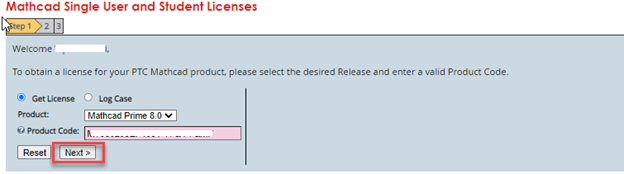
  2. image

     Enter the new HOST ID onto which the license needs to be transferred

    - To correctly identify the Host ID on new machine, go to Windows Start > Programs > Accessories > Command Prompt > type ipconfig/all (ENTER) and with the Physical Address below the Ethernet adapter Local Area Connection there stands the Host ID
    -  Click on #Submit Request
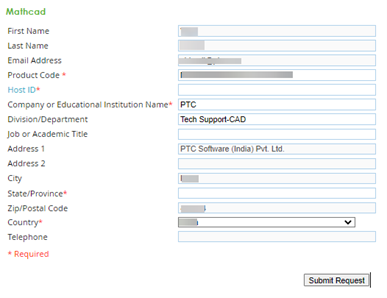
  3. image

    Below is the sample email triggered with new HOST ID license file (attachment)
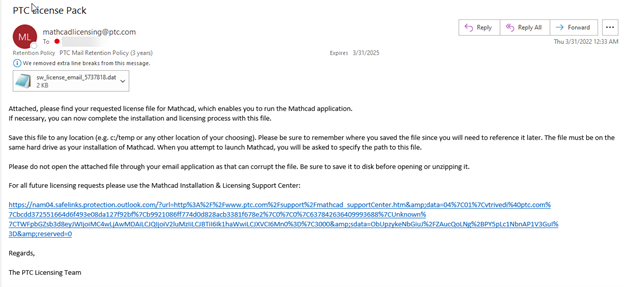
    image


  4.  Please save this license file to a secure location on your computer.


11 replies

1-Visitor
May 7, 2022

Hey!

Thanks for that, I think that would be what I'm searching for, but the website doesn't work for me. If I click on the "Next >"-button, nothing happens. What could be the problem here?

Thanks, Jonas

15-Moonstone
May 16, 2022

Hello @JM_8857703 ,


Just a quick check, did you enter the product code correctly - Can you just once again and revert.


Thanks,

Harry

10-Marble
July 6, 2022

Hi, I have tried this also, the problem I have is that the product code I was provided with is apparently for initial activation only.  How do I find the real product code?  I only have a customer number, contract number etc from my "fulfilment" email  My old PC is out of action so I cannot run Mathcad Prime to find out.

24-Ruby III
July 7, 2022

 Hi,


Tip - "How to Locate or Find Product Code for Single User and Student Edition of Mathcad": https://community.ptc.com/t5/Mathcad-Installation/How-to-Locate-or-Find-Product-Code-for-Single-User-and-Student/m-p/707806#M52 

1-Visitor
September 26, 2022

I am in the same boat! I wish I could still use the software - lost the ability updating my OS.

3-Newcomer
May 16, 2023

@Harry_Seth 
I also get this message:
"The trial program you are requesting is no longer available. Please visit the software product page on www.ptc.com to explore our latest versions."

8-Gravel
October 13, 2023

@VladimirN Its showing a command that "You have reached maximum number of license request", 

How can i avert this problemm or How can i remove the previous license 

24-Ruby III
October 13, 2023

@MM_10735997  "Reached the maximum number of license request": https://community.ptc.com/t5/Mathcad/Reached-the-maximum-number-of-license-request/td-p/704852

8-Gravel
October 13, 2023

@VladimirN  It didnt helped, same problem is shown again. I cant transfer it to the new laptop from the old

1-Visitor
September 24, 2025

Replying to JM_8857703

Didn't work for me either until I took the spaces out of my product code, then it worked fine and I got my license immediately.

1-Visitor
September 24, 2025

I had the same no joy reaction until I took the spaces out of my product code. Then it worked fine and I got my license almost immediately.

10-Marble
September 26, 2025

Replying to JR_14133122

Did this happen recently? Because I just tried it, and no luck. It says it will send the license file, but doesn't. It hasn't worked for me since December 2024.